
Page Rank Auditor: How to See Exactly Why Competitors Outrank You

Table of Contents
- Key takeaways
- What is competitor page analysis?
- How Page Rank Auditor works
- 1. Enter your page, keyword and country
- 2. It finds your position and the pages beating you
- 3. Compare every on-page factor side by side
- 4. Turn the gaps into a to-do list
- 5. Share, save and re-run
- What to fix first
- Page Rank Auditor vs. other SEO tools in My PR Manager
- Who Page Rank Auditor is for
- Frequently asked questions
- How many competitors does Page Rank Auditor compare?
- Does it use live Google results?
- What if my page is not ranking yet?
- Can I audit a competitor's page or any URL?
- How often should I re-run an audit?
- Is matching competitors enough to outrank them?
- Can I share the report with my team or a client?
- Find out why you're being outranked
When a competitor outranks you for a keyword you care about, "write better content" is not a plan. You need to know what their page does differently: how long it is, which headings and phrases it uses, how fast it loads, how its title and description are written. Page Rank Auditor in My PR Manager answers that with data. It finds the pages actually ranking at the top of Google for your keyword, audits them alongside your page, and shows every on-page difference side by side, so you get a specific list of gaps to close instead of guesswork.
Key takeaways
- Enter a page and a keyword; Page Rank Auditor runs a live Google search in the country you choose and finds your current position.
- It audits your page and the top-ranking competitor pages for that keyword, then compares them section by section.
- The report covers page score, content, meta title and description, headings, links, related search terms, consistency, word counts, page speed and server details.
- Phrase-frequency tabs show the one- to six-word phrases competitors use that your page is missing.
- Download the report as a PDF, share it with a link, re-run it after changes, and save competitor URLs to Links Inspector for backlink tracking.
What is competitor page analysis?
Competitor page analysis (also called SEO gap analysis) means comparing your page with the pages that rank above it for the same search. Google rewards pages that best satisfy a query, and the pages already in the top results are the clearest evidence of what that looks like for your keyword. Measuring how your page differs from them, in length, structure, wording, speed and metadata, shows you which improvements are most likely to move your ranking.
Doing this by hand means opening five pages, counting headings, copying titles into a spreadsheet and guessing at keyword use. Page Rank Auditor does the collection and the comparison for you in a few minutes.
How Page Rank Auditor works
1. Enter your page, keyword and country
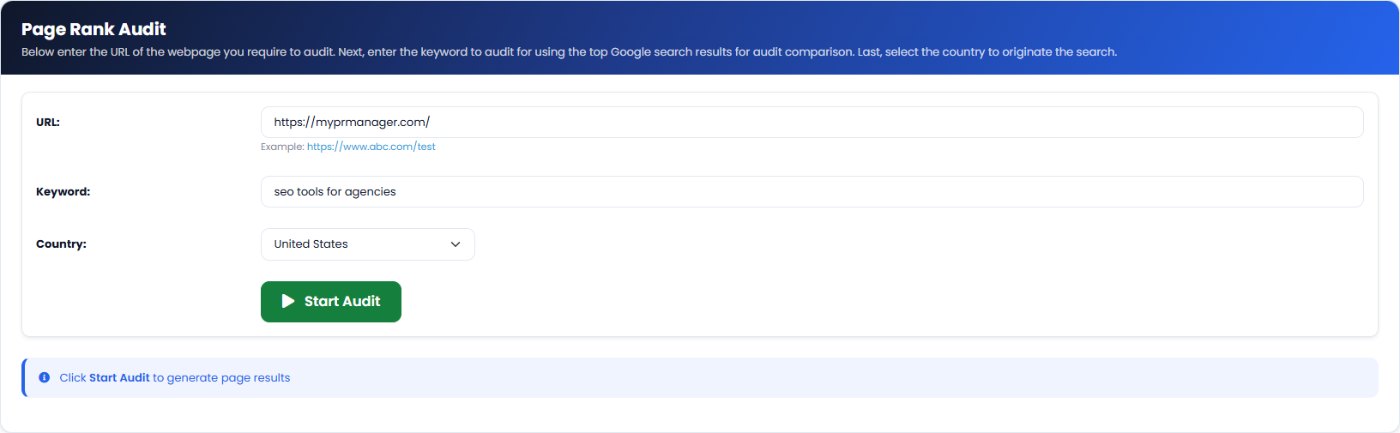
Open New Page Rank Audit, enter the URL of the page you want to rank, the keyword you want it to rank for, and the country the search should come from. Results differ between countries, so choose the market your customers are in.
2. It finds your position and the pages beating you
The audit runs a live Google search for the keyword and records where your page currently ranks, or shows that it is not in the top 100. It then fetches the top-ranking pages for the same search, typically four or five competitors, and audits each of them with the same checks it runs on your page.
3. Compare every on-page factor side by side
The report is organised into clear sections. Each one shows your page next to the competitors, with a short explanation and a Show Details button for the full comparison:
| Report section | What it compares |
|---|---|
| Webpage Score | An overall page score for you and each competitor, with each page's current Google position. |
| Content Performance | Content richness: headings, bold and strong words, keyword density and related terms. |
| Webpage Meta | Title length (40 to 60 characters) and description length (140 to 160 characters) against the competitors. |
| Page Headings | How many H1 to H6 headings each page uses, and the heading text itself. |
| Webpage Links | Internal and outbound link counts, and which authority sites competitors link to. |
| Related Search Terms | Phrase-frequency tabs from one word to six-word phrases, showing the terms competitors use and you don't. |
| Web Page Consistency | Whether your title and description match what the page body actually covers. |
| Word Analysis | Word counts in the body, in paragraphs and in bold or strong text. |
| Speed Comparison | Load timings in milliseconds, such as Largest Contentful Paint, DOM complete and time to interactive. |
| Server Information | Server type, HTTPS, URL length and SEO-friendly URL checks for every page. |
4. Turn the gaps into a to-do list
Read the report as a range, not a single target. If the competitors use between two and five H2 headings, aim for the upper part of that range; if their body text runs 1,400 to 2,000 words and yours is 600, depth is your biggest gap. The audit summary suggests aiming for the top 80 to 100 percent of the competitor range on each measure.
5. Share, save and re-run
Every audit is kept under Audited Pages. From there you can:
- Download a PDF of the report for your records or a client meeting.
- Share the report with a link, so a writer or developer can see exactly what to change.
- Re-run the audit after you update the page, to check whether you closed the gaps and moved up.
- Save competitor URLs to Links Inspector, so you can monitor the backlinks that help those pages rank.
What to fix first
Not every difference matters equally. In most audits, work through the gaps in this order:
- Search intent and depth. If competitors are long guides and yours is a short page, or the other way round, match the format searchers clearly want before anything else.
- Missing topics and phrases. Use Related Search Terms to find the subtopics every top page covers that yours doesn't, and add them naturally.
- Headings and structure. Put your main keyword in the H1 and use H2s for the subtopics, in line with the competitor range.
- Title and description. Keep them within the recommended lengths and make sure they describe what the page really delivers.
- Speed. If your load times are well behind the competitors, fix the heaviest images and scripts. Track progress with PageSpeed Insights.
- Links. Add internal links to related pages, and use Links Inspector to see who links to the competitors.
Page Rank Auditor vs. other SEO tools in My PR Manager
| Tool | Best for |
|---|---|
| Page Rank Auditor | Understanding why specific pages outrank one of your pages for one keyword. |
| Site Auditor | Crawling your whole site for technical issues on every page. |
| Keyword Position Checker | Tracking your rankings for many keywords over time. |
| Competitors Tracker | Comparing your rankings with named competitors across all your keywords. |
Who Page Rank Auditor is for
- Content writers and editors refreshing a page that has slipped down the results.
- SEO agencies that need evidence-based recommendations, and a shareable report, for clients.
- Business owners who want to know why a competitor's page ranks above theirs.
Frequently asked questions
How many competitors does Page Rank Auditor compare?
It audits the top-ranking pages Google returns for your keyword, typically four or five of them, alongside your own page.
Does it use live Google results?
Yes. Each audit runs a live Google search for the keyword in the country you choose, so you compare against the pages that rank right now.
What if my page is not ranking yet?
The audit still runs. It shows that your page is not in the top 100 results and compares it with the pages that are, which is exactly what you need to plan a new page or a rewrite.
Can I audit a competitor's page or any URL?
On the standard plan you can audit pages from your own projects. Auditing any domain is available on the PRO plan.
How often should I re-run an audit?
Re-run it after you publish changes to the page, and again after a few weeks once Google has re-crawled it. That shows whether you closed the gaps and how your position responded.
Is matching competitors enough to outrank them?
Matching the top pages gets you into contention; beating them usually takes something extra, such as more useful detail, original examples or better structure. Use the report to cover the essentials, then add what the competitors are missing.
Can I share the report with my team or a client?
Yes. Download it as a PDF or create a share link from the report page.
Find out why you're being outranked
Open Page Rank Auditor from the left menu in My PR Manager, enter the page that's stuck on page two and the keyword it should rank for, and run your first audit. In a few minutes you'll have a side-by-side list of what the top pages do that yours doesn't. New to My PR Manager? Start your free trial.
Related guides: Site Auditor · Links Inspector · Keyword Research Tool · AEO Page Auditor


