
Site Auditor: Full Technical SEO Crawls Without the Guesswork

Table of Contents
- Key takeaways
- What is a technical SEO audit?
- How Site Auditor works
- 1. Create a project and choose how pages are found
- 2. Run the crawl
- 3. Review the site summary and page reports
- 4. Fix, re-crawl and compare
- Live Deep Audit: a full health check in seconds
- Instant single-page checks
- AI Site Analysis
- What to fix first
- Site Auditor vs. other audit tools in My PR Manager
- Frequently asked questions
- How often should I run a site audit?
- Do I need Google Search Console to use Site Auditor?
- Can I audit a website I don't own?
- What does the health score mean?
- Does Site Auditor work with WordPress?
- Is there a limit on audits?
- Can I share audit results with my team or a client?
- Start your first audit
Most technical SEO problems are not on the page you happen to be looking at. A broken link on an old post, a template that prints two H1 tags, a page that quietly dropped out of Google's index, a missing security header: these spread across a site without anyone noticing, and each one costs a little ranking. Site Auditor in My PR Manager finds them for you. It crawls every page of your site, scores each one, and turns the results into a prioritised list of fixes, with a one-click Live Deep Audit for when you need an answer about a single site right now.
Key takeaways
- Full-site crawls: import your pages from Google Search Console or your XML sitemap, and Site Auditor checks every one.
- Each page gets a technical score plus HTTP status, index status, headings, images, word count, internal and external links, and page and domain authority.
- Live Deep Audit scores any URL from 0 to 100 across about 30 security, SEO, performance and WordPress checks, ranked from critical to low, with a fix for each issue.
- Live Technical Audit and Live Keyword Audit check a single page instantly, no project needed.
- Schedule re-crawls with cron, add AI analysis, and export to PDF or Excel or share a report link.
What is a technical SEO audit?
A technical SEO audit checks whether search engines can find, crawl, understand and trust the pages on your site. It looks at the things readers rarely see but Google always does: status codes, broken links, title and meta tags, heading structure, canonical tags, structured data, mobile setup, page speed, HTTPS and security headers. Good content can't rank if a technical problem stops Google from indexing it or makes the page look low quality.
Checking these by hand works for five pages. It does not work for five hundred. A crawler visits every page the same way, applies the same checks, and shows you where the problems cluster.
How Site Auditor works
1. Create a project and choose how pages are found
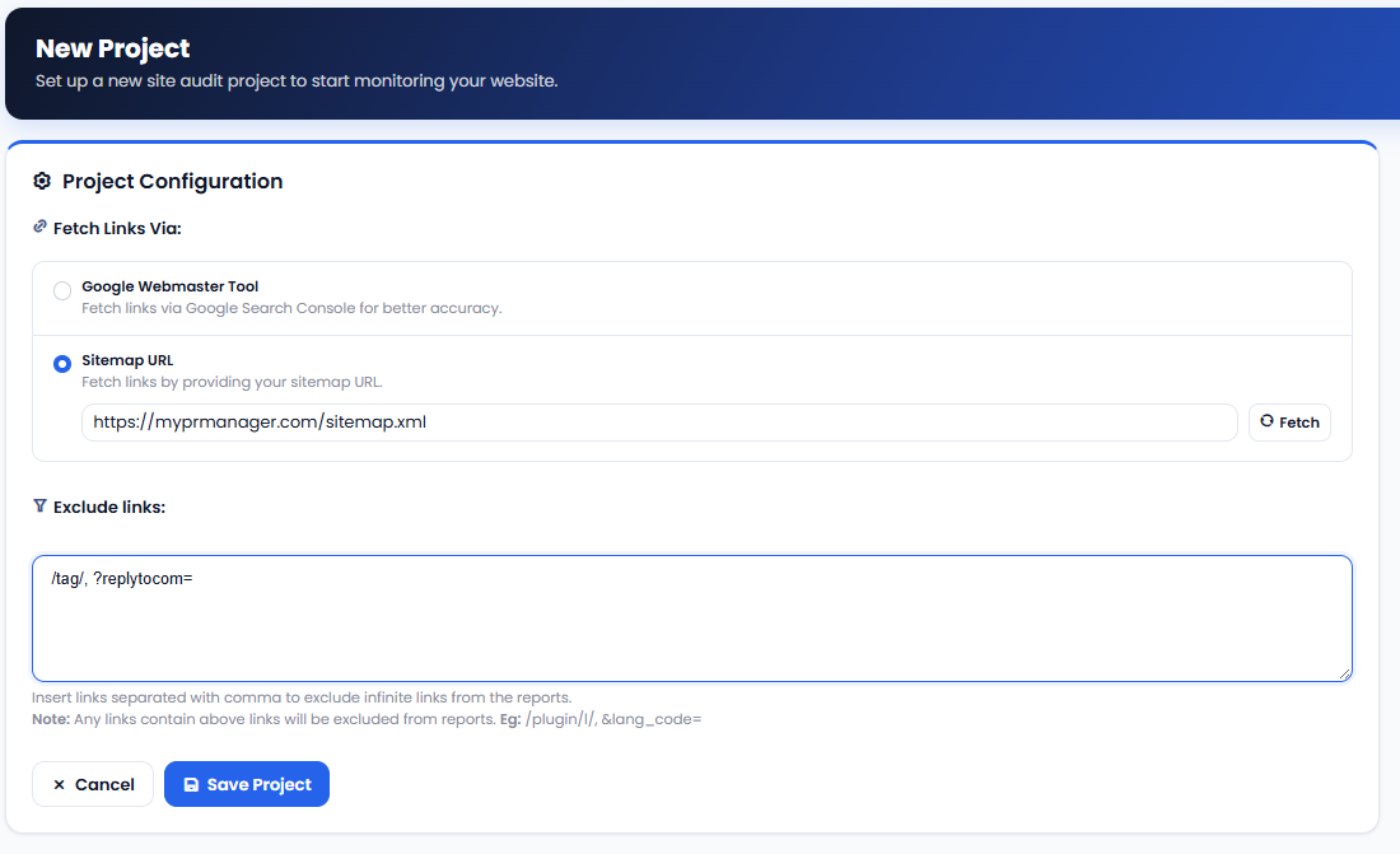
Open Audit Projects and create a new project for one of your websites. Choose where the page list comes from:
- Google Webmaster Tool: pulls the pages Google already knows about from your connected Google Search Console account. This is the most accurate option.
- Sitemap URL: enter your XML sitemap, click Fetch, and pick which content types to audit, such as posts, pages or products.
Use Exclude links to skip URLs you don't want in the report, for example tag archives or reply links, so endless variations of the same page don't drown out real issues.
2. Run the crawl
Click Run Project and the crawler works through every page in the list. Turn on the cron job and it re-crawls automatically, so new problems show up without you remembering to check.
3. Review the site summary and page reports
The Site Summary shows how many pages were found and crawled, plus your domain's age and expiry date. From there, Audit Reports lists every page with the details you need to spot problems:
| What it checks | Why it matters |
|---|---|
| HTTP status | Finds broken pages (404s) and server errors that waste crawl budget and frustrate visitors. |
| Index status | Shows which pages Google has indexed, so you can catch pages that dropped out. |
| Page title and meta | Flags missing, duplicate or badly sized titles and descriptions. |
| Headings | Lists the H1 to H6 structure of each page, including missing or multiple H1 tags. |
| Images | Lists every image and flags those missing alt text. |
| Word count | Highlights thin pages that may need more depth. |
| Internal and external links | Counts links into and out of each page, including nofollow links. |
| Page and domain authority | Shows page authority, domain authority and spam score, so you can fix your strongest pages first. |
| Primary keyword | Lets you set a target keyword per page and track how well the page supports it. |
Open any page for its Page Technical Score and a breakdown of every test it passed or failed, with tips on how to improve it. AI Optimise gives you AI suggestions for that page.
4. Fix, re-crawl and compare
Work through the issues, re-run the project, and compare the latest crawl with the previous one to confirm the fixes took. Export the results to PDF or Excel for your records or a client report.
Live Deep Audit: a full health check in seconds
When you need a quick answer about one site, such as a new client or a prospect, open Live Deep Audit, enter the URL and click Run Audit. In about 10 to 20 seconds you get a health score out of 100 and every issue sorted by severity: critical, high, medium and low. Each issue explains what's wrong and how to fix it.
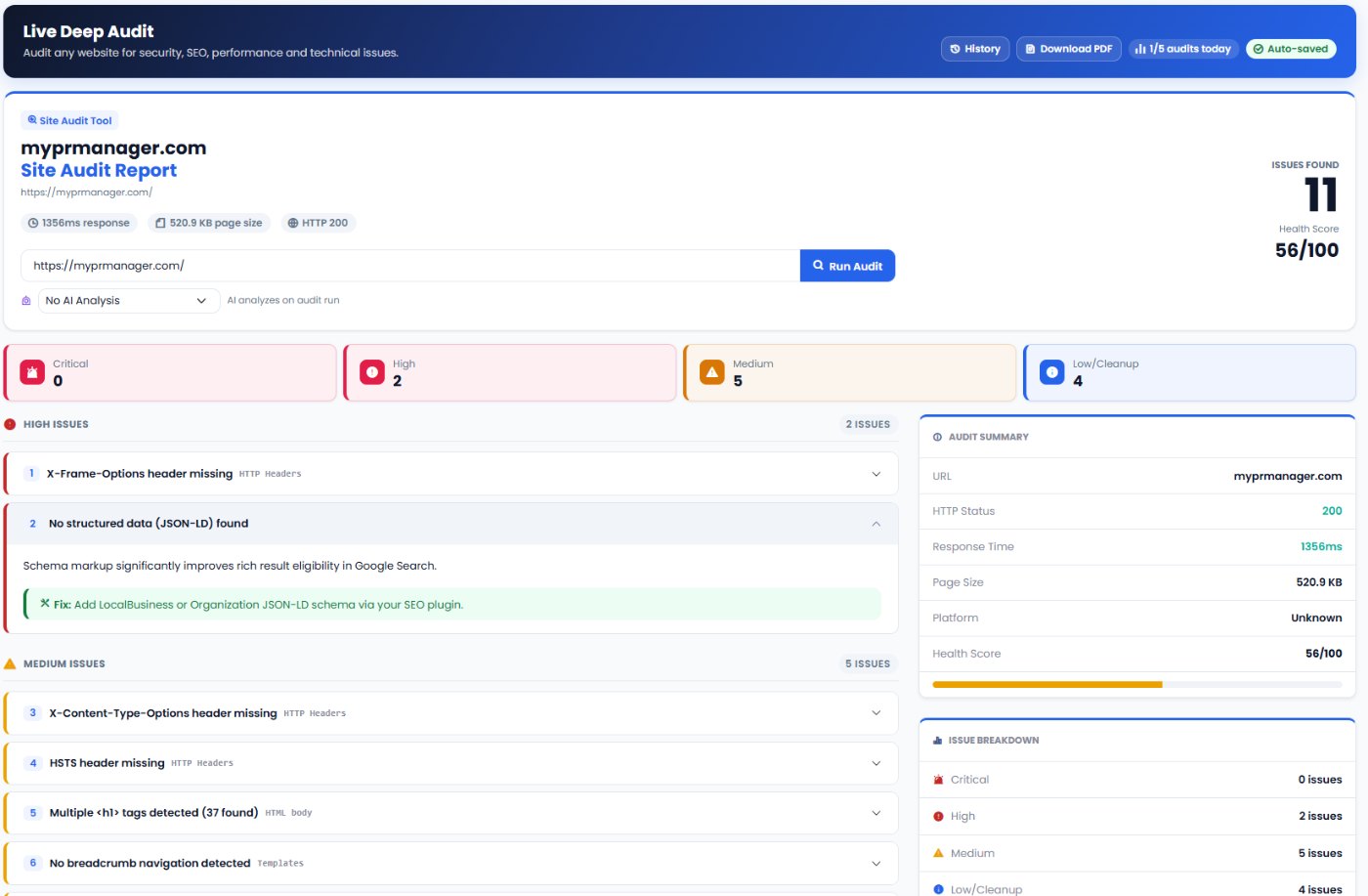
The checks cover four areas:
- Security: HTTPS, HTTP-to-HTTPS redirects, exposed
wp-config.phpor SQL backup files, and security headers such as HSTS, X-Frame-Options and X-Content-Type-Options. - On-page SEO: title tag, meta description length, H1 tags, canonical URL, language attribute, mobile viewport, a noindex on the homepage, JSON-LD structured data, Open Graph and Twitter cards, breadcrumbs and image alt text.
- Performance: response time, GZIP or Brotli compression and HTML page size.
- Site files and WordPress: XML sitemap, robots.txt and favicon, and on WordPress sites an exposed version number, readme or licence file, admin URL and missing SEO plugin.
The report ends with a fix priority order: security first, then the SEO foundation, content and UX, performance, and finally clean-up. Every audit is saved to History automatically, can be downloaded as a PDF or shared with a link, and can include an AI analysis written by the AI model you choose.
Instant single-page checks
You don't always need a full crawl. Two live checkers work on any single URL:
- Live Technical Audit: on-page technical health for one page, with a score and the tests it failed.
- Live Keyword Audit: how well one page is optimised for one keyword, including where the keyword appears and related phrases.
Both are saved under LIVE Audit Reports, so you can come back to them, download them or share them.
AI Site Analysis
Raw data tells you what's wrong; AI Site Analysis tells you what to do about it. Run it on a crawled project and it reads the audit results and writes a plain-language report: a summary of the site's health, the most important problems, and a prioritised action plan. Reports are saved per project and can be downloaded as a PDF or shared.
What to fix first
- Anything that blocks indexing. A noindex tag on important pages, server errors and broken pages come first, because Google can't rank what it can't reach.
- Security problems. Exposed configuration or backup files and missing HTTPS put your site and visitors at risk, and browsers warn people away from insecure sites.
- Titles, descriptions and H1s. They are quick to fix and directly affect how your pages appear and click through in search results.
- Structured data and canonicals. These help Google understand your pages and avoid duplicate-content confusion.
- Speed and page weight. Compress large pages and enable GZIP. Track progress with PageSpeed Insights.
- Clean-up. Alt text, favicon and social tags matter, but only after the essentials are in place.
Site Auditor vs. other audit tools in My PR Manager
| Tool | Best for |
|---|---|
| Site Auditor | Finding technical problems across every page of your site, and quick health checks on any URL. |
| Page Rank Auditor | Comparing one page with the pages that outrank it for a keyword. |
| AEO Page Auditor | Scoring a page for how well AI answer engines can understand and cite it. |
| Page URL Indexer | Getting new or fixed pages indexed faster once the audit is clean. |
Frequently asked questions
How often should I run a site audit?
Run a full crawl at least once a month, and after any redesign, migration or large content update. Turn on the cron job and Site Auditor re-crawls on a schedule for you.
Do I need Google Search Console to use Site Auditor?
No. Google Search Console gives the most accurate page list, but you can create a project from your XML sitemap instead.
Can I audit a website I don't own?
Yes, with Live Deep Audit. It checks any public URL, which makes it useful for sizing up a new client or a prospect. Full crawl projects run on websites you've added to your account.
What does the health score mean?
The Live Deep Audit health score runs from 0 to 100 and drops for every issue found, more for critical and high issues than for low ones. Use it to track progress: fix the issues, run the audit again, and watch the score rise.
Does Site Auditor work with WordPress?
Yes. It works with any website, and when it detects WordPress it adds WordPress-specific checks, such as an exposed version number, a public readme file or a missing SEO plugin.
Is there a limit on audits?
The number of Live Deep Audits you can run each day depends on your plan. The report header shows how many you've used today.
Can I share audit results with my team or a client?
Yes. Download audits as PDF or Excel, or create a share link that anyone can open without logging in.
Start your first audit
Open Site Auditor from the left menu in My PR Manager. For a quick look, run a Live Deep Audit on your homepage; for the full picture, create a project from your sitemap and run your first crawl. In a few minutes you'll know exactly what's holding your site back and what to fix first. New to My PR Manager? Start your free trial.
Related guides: Page Rank Auditor · Page URL Indexer · PageSpeed Insights · Links Inspector


