
Social Media Checker: Watch Your Follower Growth Without the Manual Checking

Table of Contents
- Key takeaways
- What is social media follower tracking?
- How Social Media Checker works
- 1. Add your social media profiles
- 2. Let the tool collect your stats
- 3. Check the Social Media Stats Summary
- 4. Dig into the history
- 5. Connect growth to your content
- What to watch first
- Social Media Checker vs. other tools in My PR Manager
- Who Social Media Checker is for
- Frequently asked questions
- Which platforms can I track?
- What does Social Media Checker measure?
- How do I add a profile?
- Why does a platform ask for an API connection?
- Can I compare this month with last month?
- Can I track competitors' public profiles?
- See how your audience is really growing
Follower growth is one of the simplest signs of whether your social media is working. But your audience is spread across Facebook, X, Instagram, YouTube, Pinterest and more, and opening each app to note the numbers, then trying to remember what they were last month, doesn't scale. Social Media Checker in My PR Manager tracks it for you. Add each profile once, and it collects your followers and likes on a regular schedule, so you can compare periods and see which channels are really growing.
Key takeaways
- Track followers and likes for Facebook, X (Twitter), Instagram, Reddit, Pinterest and YouTube profiles in one place.
- Add each profile by pasting its public page link, and use Test Connection to check it can be read before you save.
- Stats are collected automatically on a schedule, building a growth history instead of a single snapshot.
- Compare any period from 1 day to 1 year and see the change for every profile.
- Pair the numbers with your posting plan to see which campaigns actually grew your audience.
What is social media follower tracking?
Follower tracking means recording your audience size on each social network over time. A single count tells you how big your audience is today. A history shows whether it's growing, flat or shrinking, how fast, and on which platforms, so you can put your time where it pays off.
Social Media Checker is a pure measurement tool: it tells you what's happening to your audience, separate from the work of posting. That makes it a useful check on your content strategy.
How Social Media Checker works
1. Add your social media profiles
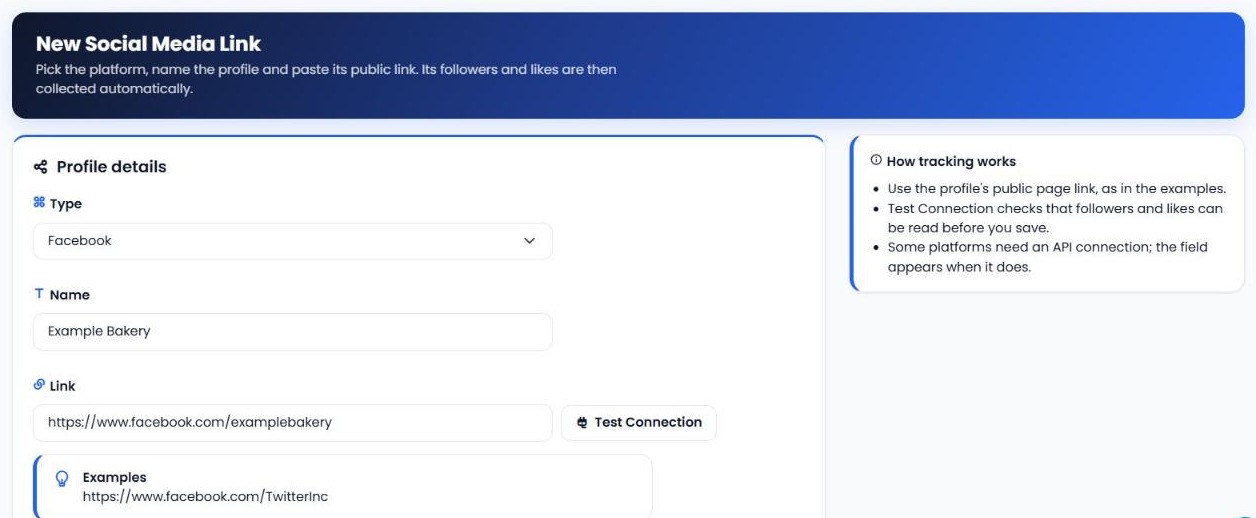
Open Social Media Links and click New Social Media Link. Pick the platform, give the profile a name and paste its public page link, following the example shown in the form. Click Test Connection to check that followers and likes can be read before you save. Some platforms need an API connection; when they do, the field appears in the form.
2. Let the tool collect your stats
Once a profile is added, its followers and likes are collected automatically on a regular schedule. Every check adds to your history, so the longer you track, the clearer your growth trend becomes.
3. Check the Social Media Stats Summary
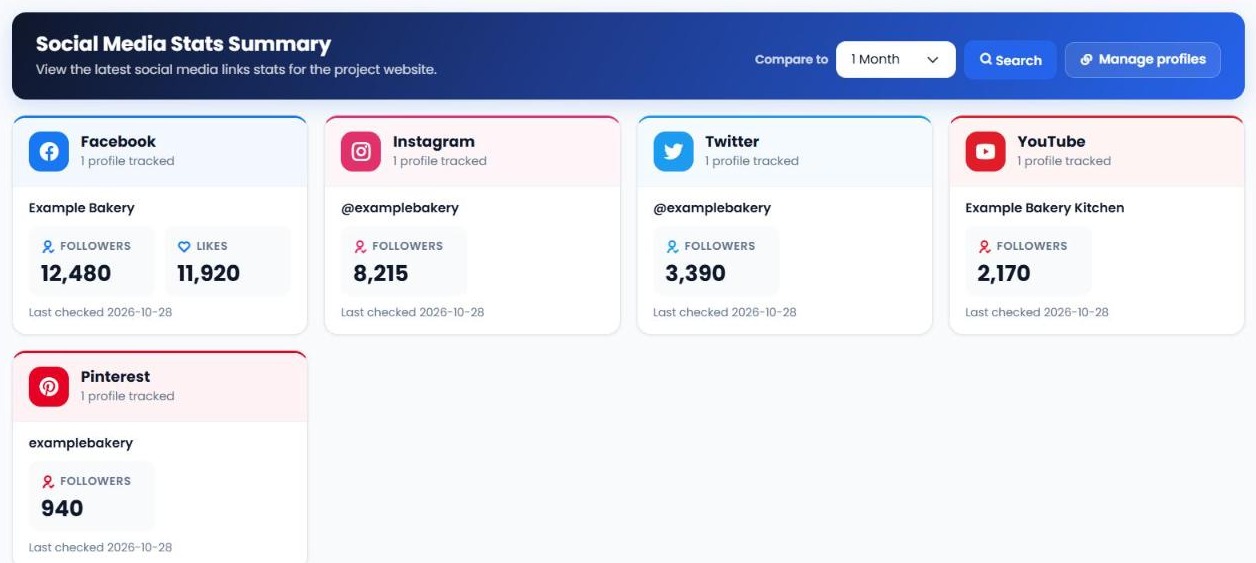
The Report Summary shows each platform side by side, with the profiles you track, their current followers and likes, and when they were last checked. Choose a comparison period, from 1 day to 1 year, to see the change for every profile.
4. Dig into the history
Use the performance, detailed and graphical reports to compare periods, see every collected snapshot and chart a profile's growth over time.
5. Connect growth to your content
Compare jumps or dips in followers with what you posted at the time. That shows which campaigns, formats and platforms actually grew your audience, and which didn't.
| Report | What it shows you |
|---|---|
| Report Summary | Every platform's current followers and likes side by side, with the change against the period you choose. |
| Performance Reports | Followers and likes per profile, previous period vs. current period, with the difference. |
| Detailed Reports | A full table of collected snapshots over the date range you choose. |
| Graphical Reports | A chart of a profile's followers or likes over time. |
| Social Media Links | All the profiles you track, with options to add, test, edit or deactivate them. |
What to watch first
When you check your social stats, look at these in order:
- Growth rate, not just totals. A smaller channel growing fast can be worth more effort than a big one that has stalled.
- Drops. A sudden fall in followers can point to a post that missed the mark, a change in posting frequency or a platform issue.
- Your best channel. Find the platform growing fastest for the effort you put in, and do more of what works there.
- Quiet channels. Profiles with no growth for months may need a new approach, or less of your time.
- Campaign impact. Check the week after a campaign or launch to see whether it brought new followers.
Social Media Checker vs. other tools in My PR Manager
| Tool | Best for |
|---|---|
| Social Media Checker | Tracking follower and like growth across your social profiles over time. |
| Social Media Manager | Creating and posting content to every platform from one composer. |
| AI Posting Campaign | Turning one page into weeks of social content. |
| Business Review Stats | Tracking review counts and ratings across review sites. |
Who Social Media Checker is for
- Social media managers who report on audience growth every week or month.
- Businesses that want to know which social channels are worth their time.
- Marketing agencies tracking growth across several client accounts.
Frequently asked questions
Which platforms can I track?
Facebook, X (Twitter), Instagram, Reddit, Pinterest and YouTube profiles.
What does Social Media Checker measure?
Followers and likes for each profile you add, collected automatically over time.
How do I add a profile?
Go to Social Media Links, click New Social Media Link, choose the platform, add a name and paste the profile's public page link. Use Test Connection to check it before saving.
Why does a platform ask for an API connection?
Some platforms only share follower data through their official API. When that's the case, the API Connection field appears in the form so you can choose or add a connection.
Can I compare this month with last month?
Yes. Choose a comparison period, from 1 day to 1 year, and the reports show the previous and current numbers with the difference.
Can I track competitors' public profiles?
You can add any public profile link, which makes it easy to compare your growth with others in your industry.
See how your audience is really growing
Open Social Channel Stats from the left menu in My PR Manager, add a link for each profile you want to follow, and your first stats arrive with the next scheduled check. New to My PR Manager? Start your free trial.
Related guides: Business Review Stats · Article Publisher · SEO Dashboard · New Project Setup


