
Business Review Stats: Track Your Ratings Across Every Platform in One Place

Table of Contents
- Key takeaways
- What is review tracking?
- How Business Review Stats works
- 1. Add your review links
- 2. Let the tool collect your stats
- 3. Check the Review Stats Summary
- 4. Dig into the trends
- 5. Act on what you find
- What to watch first
- Business Review Stats vs. other tools in My PR Manager
- Who Business Review Stats is for
- Frequently asked questions
- Which review platforms does Business Review Stats track?
- What do I need to add a Google review profile?
- How often are review stats collected?
- Can I track more than one location?
- Can I compare this month with last month?
- Does it show the text of individual reviews?
- Keep an eye on your reputation
Your reviews are often the first thing a potential customer reads about you, and the number of reviews and your star rating feed straight into trust and local search visibility. But they live on different sites: Google, Yelp, Tripadvisor, Trustpilot. Checking each one by hand, and remembering what the numbers looked like last month, is slow and easy to forget. Business Review Stats in My PR Manager does it for you. Add each review page once, and it collects your review count and rating on a regular schedule, building a history you can compare, chart and act on.
Key takeaways
- Track review counts and star ratings on Google, Yelp, Tripadvisor and Trustpilot in one dashboard.
- Add a review link once per profile. For Google, use the business name and Place ID. For the other platforms, paste the public review page link.
- Stats are collected automatically on a schedule, so you build a real history, not a one-off snapshot.
- Compare any period from 1 day to 1 year, and see the change in reviews and rating for every profile.
- Use summary, performance, detailed and graphical reports to spot slowing reviews or a falling rating early.
What is review tracking?
Review tracking means recording how many reviews you have and your average star rating on each review site, over time. A single number tells you where you are today. A history tells you which direction you're heading: whether new reviews are still coming in, whether your rating is slowly slipping, or whether a recent push for reviews is working.
That trend matters because reviews rarely change dramatically overnight. Spotting a slow decline early gives you time to respond before it becomes obvious to customers browsing your listings.
How Business Review Stats works
1. Add your review links
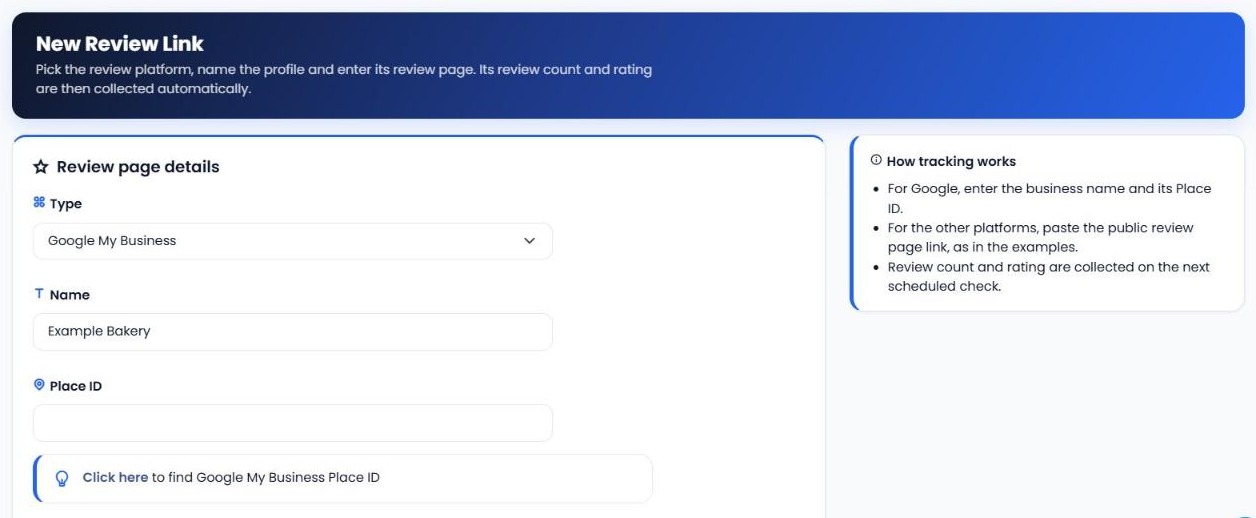
Open Review Links and click New Review Link. Choose the platform, give the profile a name and enter its review page:
- Google My Business: enter the business name and its Place ID. There's a link in the form to help you find the Place ID.
- Yelp, Tripadvisor and Trustpilot: paste the public review page link for your business.
2. Let the tool collect your stats
Once a link is added, your review count and rating are collected automatically on the next scheduled check, and on every check after that. You can track several profiles per platform, such as multiple locations, and deactivate or edit a link at any time.
3. Check the Review Stats Summary
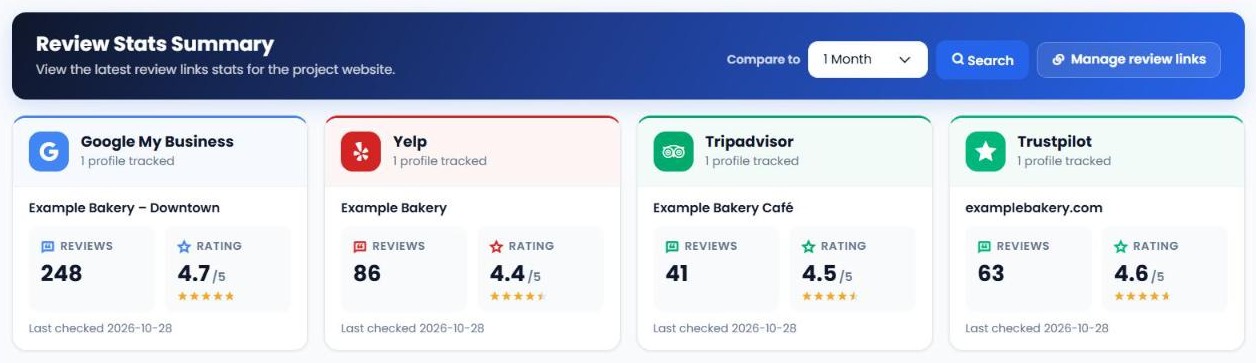
The Report Summary shows every platform side by side: the profiles you track, their current number of reviews, star rating and when they were last checked. Choose a comparison period from 1 day to 1 year to see how each profile has changed.
4. Dig into the trends
Use the reports to look closer at any platform or profile, compare periods and chart changes over time.
5. Act on what you find
If reviews slow down on one platform, ask recent customers for feedback there. If your rating dips, read the latest reviews, respond and fix the underlying issue, then watch the trend recover.
| Report | What it shows you |
|---|---|
| Report Summary | Every platform's current reviews and rating side by side, with the change against the period you choose. |
| Performance Reports | Reviews and rating for each tracked page on a platform, previous period vs. current period, with the difference. |
| Detailed Reports | A full table of collected snapshots over the date range you choose. |
| Graphical Reports | A chart of the review count or rating for one review page over time. |
| Review Links | All the review pages you track, with options to add, edit, activate or deactivate them. |
What to watch first
When you check your review stats, look at these in order:
- Rating drops. Even a fall from 4.6 to 4.4 can change how customers see you. Find the reviews that caused it and respond.
- Review velocity. If new reviews have slowed or stopped, your profile can look less active than competitors'.
- Gaps between platforms. A strong Google rating but a weak Yelp or Tripadvisor rating shows where customers have a different experience, or where you need more reviews.
- Location differences. If you track several locations, compare them to find the ones that need attention.
- Missing platforms. If customers review you somewhere you don't track yet, add that review link.
Business Review Stats vs. other tools in My PR Manager
| Tool | Best for |
|---|---|
| Business Review Stats | Tracking review counts and ratings across review sites over time. |
| Business Listing Manager | Finding inconsistent business listings before customers do. |
| Google Local 3-Pack Tracking | Knowing when you show up in Google's local map results. |
| Social Media Checker | Watching follower growth across your social channels. |
Who Business Review Stats is for
- Local businesses like restaurants, hotels, clinics and shops whose customers check reviews before they visit.
- Multi-location brands that need to compare review performance across branches.
- Marketing agencies that report on reputation and reviews for clients.
Frequently asked questions
Which review platforms does Business Review Stats track?
Google My Business, Yelp, Tripadvisor and Trustpilot.
What do I need to add a Google review profile?
The business name and its Google Place ID. The New Review Link form includes a link to help you find the Place ID.
How often are review stats collected?
Automatically, on a regular schedule. New links are collected on the next scheduled check, then on every check after that.
Can I track more than one location?
Yes. Add a separate review link for each location's profile on each platform.
Can I compare this month with last month?
Yes. Choose a comparison period, from 1 day to 1 year, and the reports show the previous and current numbers with the difference.
Does it show the text of individual reviews?
Business Review Stats focuses on review counts and star ratings over time. Read and reply to individual reviews on each platform.
Keep an eye on your reputation
Open Business Review Stats from the left menu in My PR Manager, add a review link for each platform your customers use, and your first stats arrive with the next scheduled check. New to My PR Manager? Start your free trial.
Related guides: SEO Dashboard · New Project Setup · My PR Manager overview · My PR Manager Support


