
Business Listing Manager: Find Every Inconsistent Listing Before Customers Do

Table of Contents
- Key takeaways
- What is NAP consistency?
- How Business Listing Manager works
- 1. Add your business profile
- 2. Connect your accounts
- 3. Run a scan
- 4. Review your results
- 5. Fix the issues
- Which platforms are scanned, and what's checked
- How the health score works
- What to fix first
- Best practices for consistent listings
- Good to know
- Who Business Listing Manager is for
- Frequently asked questions
- Which platforms does Business Listing Manager scan?
- What does NAP mean?
- What does the health score mean?
- Why does a platform say "manual check"?
- Does it fix my listings automatically?
- How often should I scan?
- Make sure customers can always find you
Your business name, address and phone number (often called NAP) appear on dozens of sites: Google, Facebook, Yelp, Apple Maps, directories and more. When they don't match, customers call disconnected numbers or drive to old addresses, and search engines and AI assistants become less sure your business information is right. Checking every platform by hand isn't realistic. Business Listing Manager in My PR Manager scans 13 platforms in one go, shows where you're listed, where details are wrong and where you're missing, and rolls it all into a single health score.
Key takeaways
- One scan checks 13 platforms, including Google Business Profile, Facebook, LinkedIn, Yelp, Yellow Pages, Foursquare, Apple Maps and the Better Business Bureau.
- Results show where your business is listed, where information is wrong, where listings are missing and which matches need a manual check.
- A health score from 0 to 100 drops for every issue, weighted by how important the field and the platform are.
- A wrong phone number or address costs the most points, because those are what stop customers reaching you.
- Each result links straight to the platform, so you can claim, update or create the listing right away.
What is NAP consistency?
NAP consistency means your business name, address and phone number are exactly the same everywhere they appear online. Search engines and AI systems compare your details across many sources. Even small differences, like "Suite 201" on one site and "Ste. 201" on another, create uncertainty, and uncertainty can weaken your visibility in local results, map listings and AI-generated answers.
Every accurate listing also acts as a citation for your business. More consistent citations mean stronger local signals and more trust from customers.
How Business Listing Manager works
1. Add your business profile
Go to My Businesses and click Add Business. Enter your business name, address, city, state, country, phone number and website. The scan compares every platform against these details, so the more accurate they are, the more precise your report. Linking a Google Place ID to the business gives more accurate Google matching.
2. Connect your accounts
For the deepest checks, connect Facebook and LinkedIn through the Social Media Engine, and add Search API credentials in Settings to enable the Google and discovery checks. Without the Search API, discovery platforms are flagged for manual checking instead.
3. Run a scan
Open New Scan, choose your business and the platforms to check, and click Run Scan. You can re-run a scan any time to track your progress.
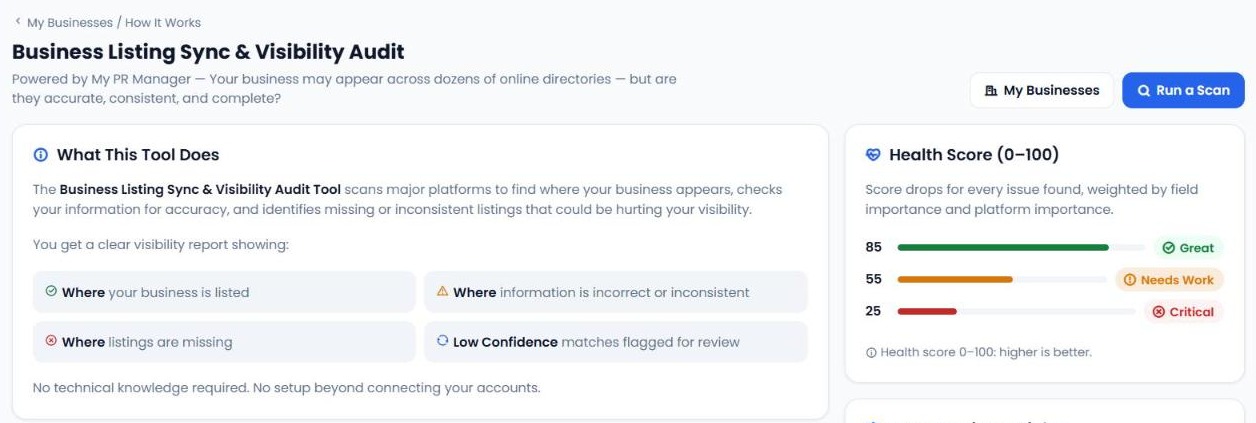
4. Review your results
Your report shows four things for each platform: where your business is listed, where information is incorrect or inconsistent, where listings are missing, and low-confidence matches that need you to confirm they're really your business.
5. Fix the issues
Each listing includes a direct link, so you can claim, update or create your profile on that platform straight away. Then run the scan again to watch your health score rise.
Which platforms are scanned, and what's checked
Platforms are checked in two ways. Direct connections give the deepest check. Discovery platforms are found through search and matched by business name.
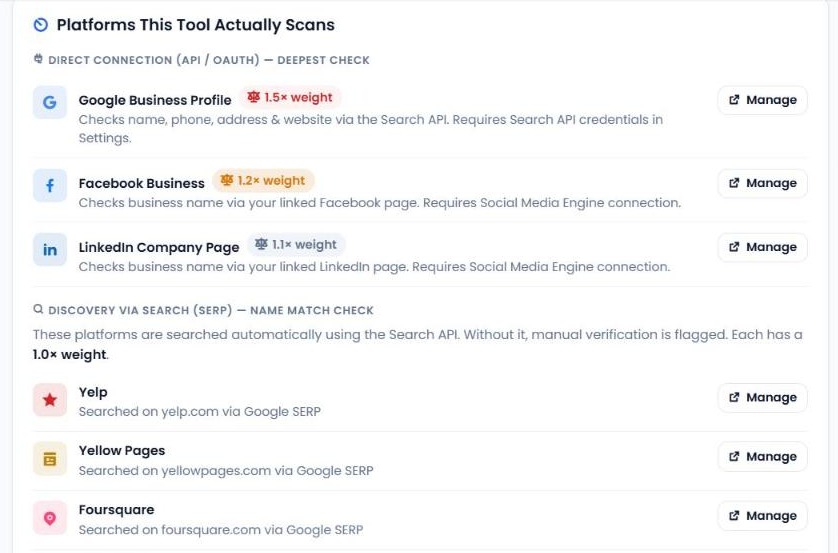
| Platform | How it's checked | Weight |
|---|---|---|
| Google Business Profile | Name, phone, address and website, via the Search API | 1.5× |
| Facebook Business | Business name, via your linked Facebook page | 1.2× |
| LinkedIn Company Page | Business name, via your linked LinkedIn page | 1.1× |
| Yelp, Yellow Pages, Foursquare, Apple Maps, Better Business Bureau | Found by search; business name and listing link | 1.0× |
| Instagram Business | Found by search; business name and listing link | 0.9× |
| MapQuest, Hotfrog, Manta, X (Twitter) | Found by search; business name and listing link | 0.8× |
How the health score works
Your health score runs from 0 to 100, and higher is better. Around 85 is great, around 55 needs work and around 25 is critical. Points are taken off for each issue, depending on what's wrong:
| Issue | Impact |
|---|---|
| Phone number wrong | −30 points |
| Address wrong | −30 points |
| Account not connected (Facebook or LinkedIn) | −30 points |
| Business name wrong | −20 points |
| Website wrong | −20 points |
| Not found on the platform | −15 points |
| Low-confidence match | −10 points |
| Manual check needed | −5 points |
Issues on Google count 1.5×, Facebook 1.2× and LinkedIn 1.1×, so problems on the platforms customers use most affect your score the most. For Google, a match is scored on phone digits, website domain, address similarity and name similarity. On discovery platforms, a listing with at least 60% name similarity counts as a good match; anything lower is flagged as low confidence.
What to fix first
- Wrong phone numbers and addresses, especially on Google. These directly stop customers reaching you.
- Not connected accounts. Connect Facebook and LinkedIn so they can be checked properly.
- Missing listings on major platforms like Yelp, Apple Maps and Yellow Pages. Use the link to create them.
- Name and website mismatches. Use the exact same business name and website URL everywhere.
- Low-confidence matches. Confirm whether each one is really your business, and claim it or report duplicates.
Best practices for consistent listings
- Use the exact same business name everywhere.
- Keep address formatting identical, down to abbreviations like "Suite" or "Ste."
- Use one primary phone number.
- Always include your website URL.
- Use the same logo and branding, and complete every profile field you can.
- Also keep listings up to date on platforms the tool doesn't scan automatically, such as data aggregators like Data Axle and Neustar Localeze, and industry sites like TripAdvisor, Angi, Houzz or Healthgrades.
Good to know
Business Listing Manager finds the problems; you fix them directly on each platform. It doesn't sync data across platforms automatically. For Facebook and LinkedIn it currently checks the business name only.
Who Business Listing Manager is for
- Local businesses whose customers find them on Google Maps, Yelp and directories.
- Multi-location brands that need every branch listed correctly.
- Agencies that run local SEO and citation audits for clients.
Frequently asked questions
Which platforms does Business Listing Manager scan?
Thirteen: Google Business Profile, Facebook, LinkedIn, Yelp, Yellow Pages, Foursquare, Apple Maps, Better Business Bureau, MapQuest, Hotfrog, Manta, Instagram Business and X (Twitter).
What does NAP mean?
Name, address and phone number, the core details customers and search engines use to identify and contact your business.
What does the health score mean?
It's a score from 0 to 100 that drops for every issue found, weighted by the field and the platform. Wrong phone numbers and addresses, especially on Google, cost the most.
Why does a platform say "manual check"?
Discovery platforms are searched using the Search API. If it isn't configured in Settings, those platforms are flagged for you to check manually.
Does it fix my listings automatically?
No. It shows you what's wrong and links to each listing so you can fix it on the platform yourself.
How often should I scan?
Scan after any change to your name, address, phone or website, and regularly, such as monthly, to catch outdated or duplicate listings.
Make sure customers can always find you
Open Business Listing Manager from the left menu in My PR Manager, add your business and run your first scan. In minutes you'll know where you're listed, what's wrong and what to fix first. New to My PR Manager? Start your free trial.
Related guides: Business Review Stats · Social Media Checker · SEO Dashboard · New Project Setup


