
AI Posting Campaign: Turn One Page Into Weeks of Social Content

Table of Contents
- Key takeaways
- What is an AI social media campaign?
- How AI Posting Campaign works
- 1. Choose the campaign type and basics
- 2. Let the AI research your page
- 3. Set up the schedule
- 4. Generate the posts
- 5. Review, edit and confirm
- Before you confirm: what to check first
- AI Posting Campaign vs. other tools in My PR Manager
- Who AI Posting Campaign is for
- Frequently asked questions
- What's the difference between Multi-Channel and Single-Channel campaigns?
- Will posts publish automatically?
- Which AI can I use?
- Does it use my AI tokens?
- Can I use my own images?
- Do I need a keyword?
- Keep your promotion going
Promoting a new page, offer or article on social media is rarely a one-post job. A real campaign means a steady run of posts across several channels for days or weeks, each worded for its platform and timed sensibly. Writing all of that by hand is exactly why most promotion fizzles out after the first day or two. AI Posting Campaign in My PR Manager takes the heavy lifting off your plate. Point it at the page you want to promote, and the AI researches your business and that page, writes a whole batch of posts with suggested publish times, and waits for you to review and approve them before anything goes live.
Key takeaways
- Turn one target page into a full, scheduled batch of social posts in a 4-step wizard.
- The AI reads your main website and the target page, and researches relevant longtail keywords before it writes.
- Choose a Multi-Channel campaign to share each post across several channels, or a Single-Channel campaign written natively for one platform.
- Pick your AI writer and decide how many posts to create, how often to post and which channels to use.
- Nothing is published until you review the drafts, edit anything you like and confirm the schedule.
What is an AI social media campaign?
An AI social media campaign uses artificial intelligence to plan and write a series of posts promoting one thing, such as a landing page, product, event or article. Instead of writing ten or twenty posts yourself, you give the AI the page and your goals. It drafts the posts and suggests when to publish them, and you stay in control of what actually goes out.
The benefit isn't just speed. A campaign keeps your promotion going at a steady pace, so the page you worked hard on keeps getting seen, not just on launch day.
How AI Posting Campaign works
1. Choose the campaign type and basics
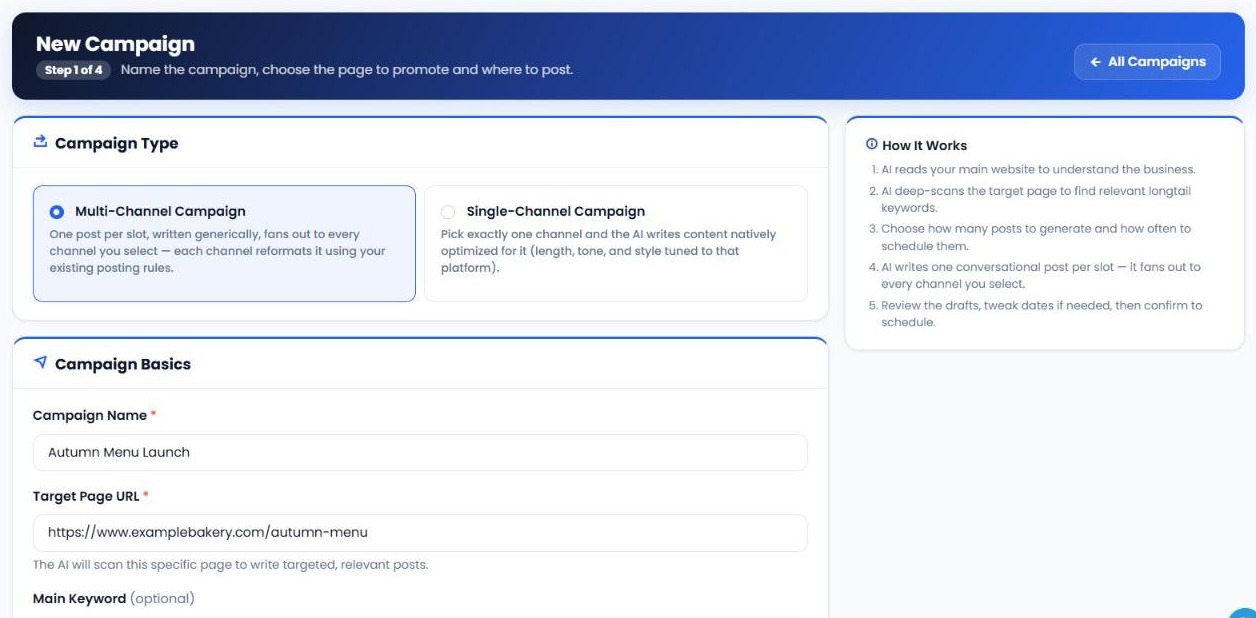
Click New Campaign. First, choose the campaign type:
- Multi-Channel Campaign: one post per time slot, written generically, shared to every channel you select. Each channel then reformats it using your existing posting rules.
- Single-Channel Campaign: pick exactly one channel, and the AI writes content natively for it, with the length, tone and style tuned to that platform.
Then give the campaign a name, enter the Target Page URL you want to promote, add an optional Main Keyword to steer the keyword research, and choose your AI Creator, such as MyPRM ChatGPT, DeepSeek or Gemini. AI tokens for the campaign are used from your plan's quota.
2. Let the AI research your page
The AI reads your main website to understand your business, then deep-scans the target page to find relevant longtail keywords. That context is what lets it write posts about your actual offer, rather than generic filler.
3. Set up the schedule
Choose how many posts to generate, how far apart to schedule them, which connected social channels to post to, and whether to upload your own images or have them generated by AI.
4. Generate the posts
The AI writes the full batch at once, one conversational post per time slot, each with a suggested publish date and time.
5. Review, edit and confirm
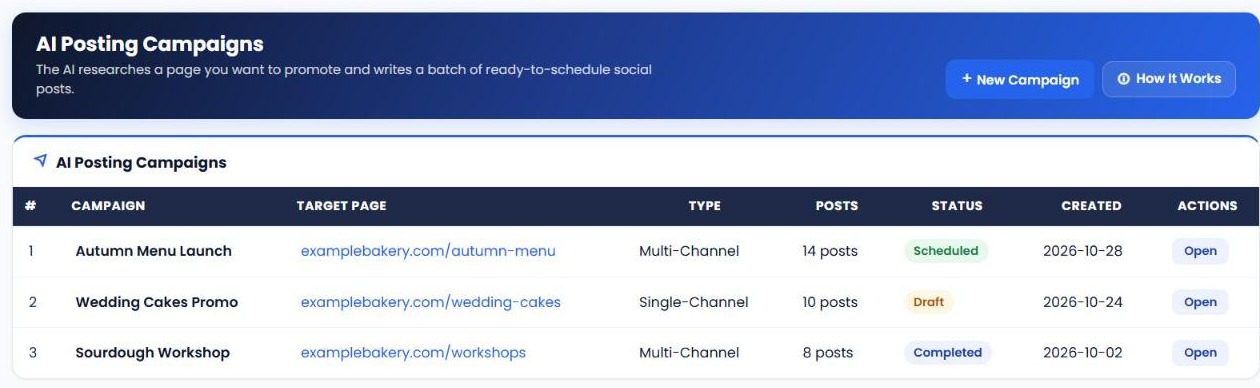
Read through the drafts and change any post's text, image or scheduled time. When you're happy, confirm the batch to schedule it. Until then, nothing is published.
| Setting | What it controls |
|---|---|
| Campaign type | Multi-Channel (one post shared to several channels) or Single-Channel (written natively for one platform). |
| Target Page URL | The page the AI researches and every post promotes. |
| Main Keyword | Optional. Steers the AI's longtail keyword research. |
| AI Creator | Which AI model researches and writes the campaign. |
| Number and spacing of posts | How many posts are created and how often they're scheduled. |
| Channels | Which connected social channels receive the posts. |
| Images | Upload your own images or have them generated by AI. |
Before you confirm: what to check first
- Accuracy. Make sure prices, dates, names and claims are correct.
- Variety. Check that posts don't all say the same thing in the same way. Edit a few to lead with different benefits.
- Calls to action. Each post should give people a reason to click through to the page.
- Images. Swap any AI image that doesn't fit your brand for one of your own.
- Timing. Adjust publish times to when your audience is most active, and avoid clashing with other campaigns.
AI Posting Campaign vs. other tools in My PR Manager
| Tool | Best for |
|---|---|
| AI Posting Campaign | Turning one page into a scheduled series of AI-written social posts. |
| Social Media Manager | Writing and posting individual updates to every platform from one composer. |
| Article Publisher | Writing and publishing full blog articles to your connected sites. |
| Social Media Checker | Measuring follower growth to see whether your campaigns are working. |
Who AI Posting Campaign is for
- Small businesses that want to promote new pages, offers and events without spending hours writing posts.
- Marketing agencies running promotional campaigns for several clients.
- Content teams that want every new article or landing page promoted consistently after launch.
Frequently asked questions
What's the difference between Multi-Channel and Single-Channel campaigns?
A Multi-Channel campaign writes one post per time slot and shares it to every channel you select, with each channel reformatting it. A Single-Channel campaign writes content specifically for one platform, tuned to its length, tone and style.
Will posts publish automatically?
Only after you approve them. You review the drafts, make any edits and then confirm the schedule.
Which AI can I use?
You choose the AI Creator when you set up the campaign. Options include MyPRM ChatGPT models, DeepSeek and Gemini.
Does it use my AI tokens?
Yes. The research and writing for each campaign use AI tokens from your plan's quota.
Can I use my own images?
Yes. You can upload your own images or let the AI generate them, and change any image before confirming.
Do I need a keyword?
No, the main keyword is optional. If you add one, the AI focuses its longtail keyword research around it.
Keep your promotion going
Open AI Posting Campaign from the left menu in My PR Manager, click New Campaign and point it at the page you want to promote. In a few minutes you'll have a full batch of posts ready to review. New to My PR Manager? Start your free trial.
Related guides: Article Publisher · Social Media Checker · Business Post Manager · Keyword Research Tool


