
Keyword Position Checker: Know Exactly Where You Rank, Every Day

Table of Contents
- Key takeaways
- What is a keyword position checker?
- How Keyword Position Checker works
- 1. Add your keywords
- 2. Let it track automatically
- 3. Compare periods in the Keywords Performance Report
- 4. Dig deeper with summary and detail reports
- 5. Check a position live
- 6. Find more keywords worth tracking
- What to check first
- Keyword Position Checker vs. other My PR Manager tools
- Who Keyword Position Checker is for
- Frequently asked questions
- How often are rankings checked?
- Which search engines can I track?
- Why is my ranking different when I search myself?
- How many keywords can I track?
- Can I export reports for clients?
- Start tracking your rankings
Every SEO effort, whether it's a new page, a content refresh or a round of link building, has the same end goal: ranking higher for the keywords your customers search for. But checking rankings by hand is slow, inaccurate (search results are personalised) and only tells you where you stand today. It can't tell you whether you're climbing, slipping or stuck. Keyword Position Checker in My PR Manager tracks your keywords automatically every day, builds a history for each one, and shows you exactly how positions have changed between periods, so you can see what's working and catch drops before they cost you traffic.
Key takeaways
- Track the ranking position of your keywords on Google and other search engines, checked automatically every day.
- Compare average rank between periods (1 day to 1 year) and see which keywords moved up or down.
- Check any keyword's live position instantly for a specific search engine and country.
- Find related and supporting keywords with search volume, competition and difficulty.
- Export keyword lists and reports to PDF or Excel for clients and stakeholders.
What is a keyword position checker?
A keyword position checker (or rank tracker) records where your website appears in search results for a given keyword: first place, fifth, twentieth, or not at all. Tracked daily, these positions become a timeline that shows the effect of your SEO work.
Rank tracking matters because traffic is concentrated at the top of the results. Moving from position 9 to position 3 for a keyword can multiply the clicks you get from it, and falling off the first page can mean losing most of them. Without tracking, you often only notice a drop when the enquiries slow down.
How Keyword Position Checker works
1. Add your keywords
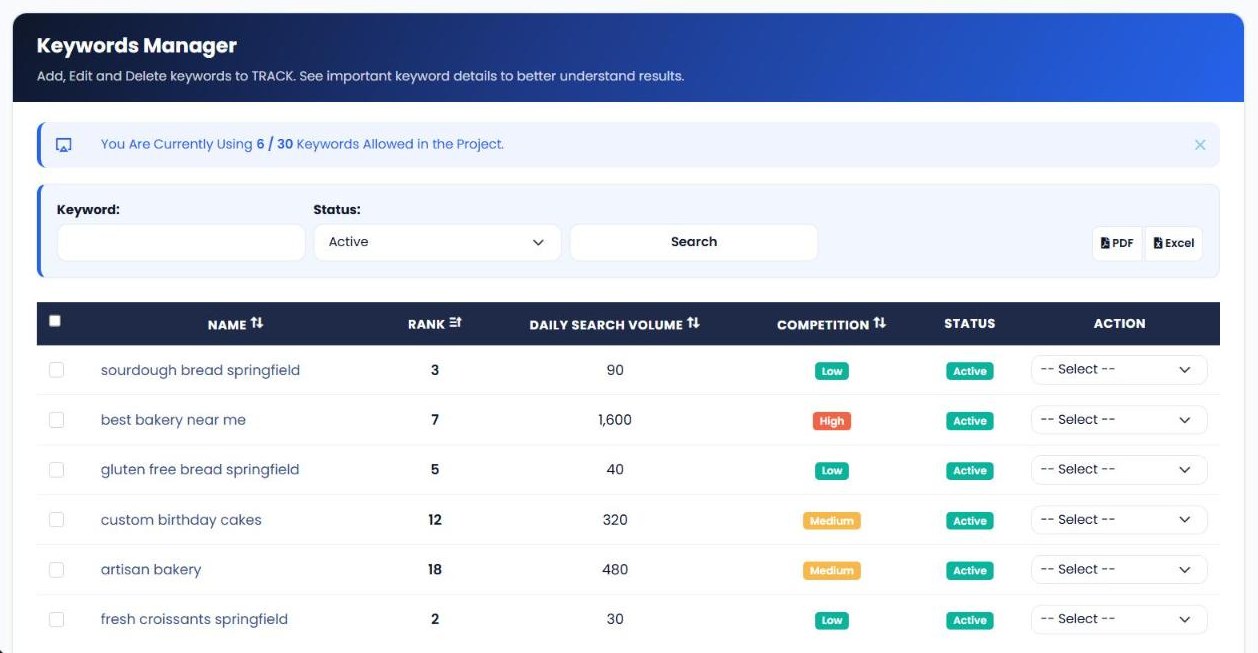
Keywords are linked to a website in My PR Manager. Some are added automatically once you add a website, and you can add more in Keywords Manager with New Keyword, or in bulk with Import Keywords. The banner at the top shows how many keywords you're using out of your plan's allowance.
2. Let it track automatically
Positions are checked automatically on a schedule, so every keyword builds a daily history without any manual work. Ranking data usually starts appearing within 24 to 48 hours of adding a keyword. Each website is tracked on the search engines set for it, such as google.com and yahoo.com.
3. Compare periods in the Keywords Performance Report
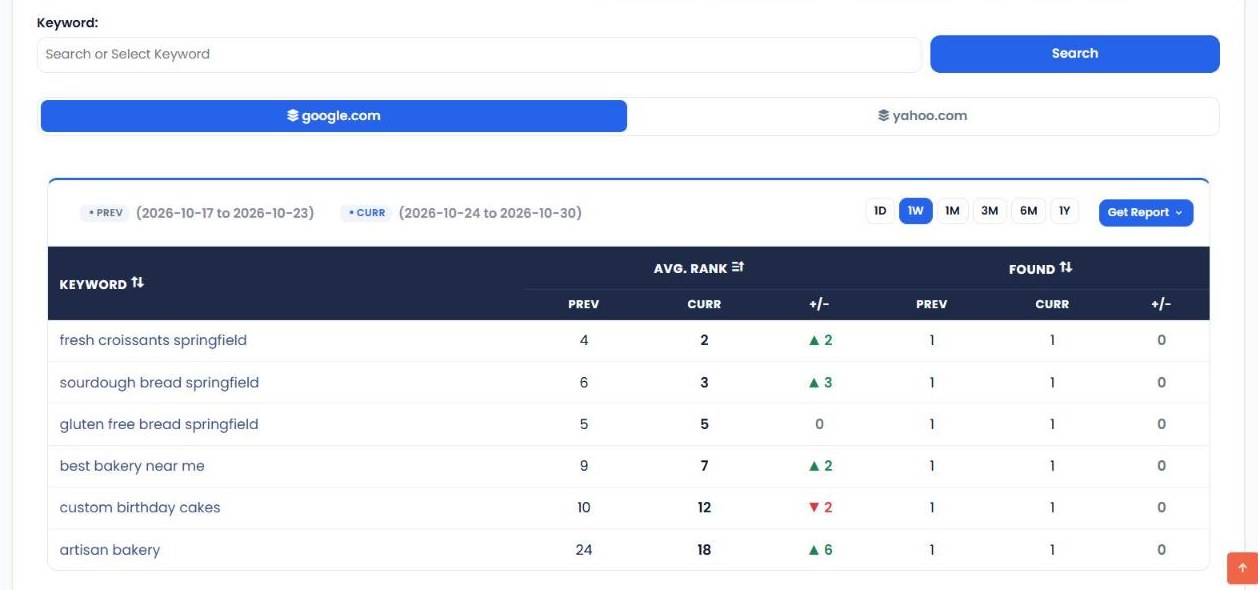
The Keywords Performance Report compares each keyword's average rank in the current period with the previous one. Choose 1D, 1W, 1M, 3M, 6M or 1Y and switch between search engines. Green arrows show keywords that moved up, red arrows show those that dropped, and the Found columns show whether the keyword appeared in search results in each period.
4. Dig deeper with summary and detail reports
Tracked Keywords Summary shows the average positions of your top 5 to top 50 keywords across search engines, compared with an earlier period. Keywords Details breaks down the history for individual keywords, and Tracked Keyword Top Pages shows which pages on your site rank for your tracked keywords.
5. Check a position live
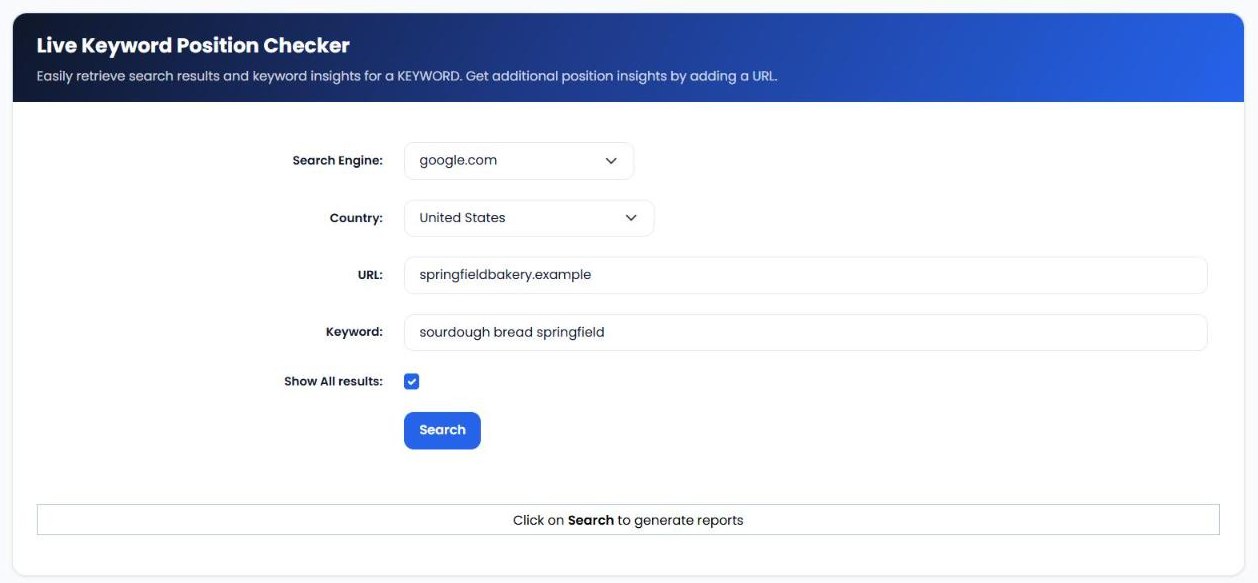
Need an answer right now? Live Keyword Position Checker lets you choose a search engine (including country versions of Google and Bing) and a country, enter your URL and a keyword, and see where you rank in the current results.
6. Find more keywords worth tracking
Related Keywords and Support Keywords suggest additional terms connected to the keywords you already track, with search appearances, clicks, impressions, search volume, competition and keyword difficulty. Filter by competition and difficulty to find terms you can realistically win.
| Report | What it shows |
|---|---|
| Keywords Manager | Every tracked keyword with rank, daily search volume, competition and status. |
| Tracked Keywords Summary | Average positions of your top keywords compared with an earlier period. |
| Keywords Performance | Previous vs. current average rank and found status for each keyword. |
| Keywords Details | Detailed ranking history for individual keywords. |
| Tracked Keyword Top Pages | Which of your pages rank for your tracked keywords. |
| Related / Support Keywords | New keyword ideas with volume, competition and difficulty. |
| Live Keyword Search | An instant position check for any keyword, search engine and country. |
What to check first
- Keywords that dropped. In the Performance Report, look at the red arrows first. A sudden fall can point to a technical problem, a lost backlink or a competitor's new page.
- Keywords in positions 4 to 15. These are close to the top and often need only small improvements, such as better titles, more detail or a few internal links, to move up.
- Keywords not found. If a keyword isn't appearing at all, check that a page is actually targeting it and that the page is indexed.
- Long-term trend, not daily noise. Rankings fluctuate day to day. Use the 1M and 3M comparisons to judge whether your work is paying off.
- Realistic new targets. In Related Keywords, filter for low competition and difficulty to find terms you can win sooner.
Keyword Position Checker vs. other My PR Manager tools
| Tool | Main job | Use it when |
|---|---|---|
| Keyword Position Checker | Track where your site ranks for specific keywords over time. | You want to measure SEO progress keyword by keyword. |
| Page Rank Auditor | Compare authority and SEO metrics with competitors. | You want to know why competitors outrank you. |
| Google Analytics & Search Console | Bring traffic, clicks and impressions into My PR Manager. | You want to see the traffic your rankings bring in. |
| Page URL Indexer | Ask search engines to discover new pages faster. | A new page targeting a keyword isn't indexed yet. |
Who Keyword Position Checker is for
- Small business owners who want to know whether they're showing up when customers search for their services.
- SEO consultants and agencies who report ranking progress to clients, with PDF and Excel exports.
- Content marketers who want to see whether new and refreshed articles are moving up.
- Local businesses tracking location keywords like "bakery in Springfield".
Frequently asked questions
How often are rankings checked?
Rankings are checked automatically on a regular schedule, typically daily, so each keyword builds a day-by-day history. New keywords usually show data within 24 to 48 hours.
Which search engines can I track?
Google is the main engine, and other supported engines such as Yahoo and Bing are available. Live Keyword Search also lets you check country-specific versions of Google and Bing.
Why is my ranking different when I search myself?
Your own searches are personalised by your location, history and device. Keyword Position Checker records positions consistently, so the trend over time is a more reliable measure than a one-off manual search.
How many keywords can I track?
It depends on your plan. Keywords Manager shows how many keywords you're using and how many your project allows.
Can I export reports for clients?
Yes. Keyword lists and related keyword reports can be exported to PDF or Excel.
Start tracking your rankings
You can't improve what you don't measure. Sign in to My PR Manager, open Keyword Position Checker, add the keywords that matter most to your business, and within a day or two you'll see exactly where you stand, and every day after that, which way you're heading.
Related guides: Page Rank Auditor · Connecting Google Analytics & Search Console · Page URL Indexer · New Project Setup


