
Competitors Tracker: See Exactly Where You Stand Against the Competition

Table of Contents
- Key takeaways
- What is competitor rank tracking?
- How Competitors Tracker works
- 1. Add your competitors
- 2. Make sure your keywords are tracked
- 3. Compare performance side by side
- 4. Star the keywords that matter most
- 5. Share or download the Favourite Summary
- What to check first
- Competitors Tracker vs. other My PR Manager tools
- Who Competitors Tracker is for
- Frequently asked questions
- How many competitors can I track?
- Which keywords are compared?
- Which search engines are supported?
- What is the Favourite Summary?
- Can I share reports with clients?
- Start tracking your competitors
SEO is a competition. There are only ten spots on the first page of Google, and every place you gain is a place someone else loses. So knowing your own rankings is only half the picture. Moving from 9th to 7th is good news, unless the competitor you're trying to beat moved from 6th to 3rd in the same week. Competitors Tracker in My PR Manager puts your keyword positions and your competitors' side by side, on Google, Yahoo and Bing, so you can see exactly where you're winning, where you're falling behind and which keywords need attention.
Key takeaways
- Add the competitors you want to watch, with just a name and website address, for each of your projects.
- See your average rank and each competitor's for every tracked keyword, side by side.
- Switch between Google, Yahoo and Bing, and compare periods from 1 day to 1 year.
- Star your most important keywords to build a Favourite Summary report.
- Download the Favourite Summary as a PDF or share it with clients, depending on your plan.
What is competitor rank tracking?
Competitor rank tracking means monitoring where your competitors rank for the same keywords you're targeting, and comparing their positions with yours over time. It answers questions your own rankings can't: who is outranking you, for which searches, and whether the gap is growing or shrinking.
It also helps you learn from the competition. When a competitor jumps ahead for an important keyword, looking at what changed on their page, such as new content, better structure or fresh backlinks, often shows you what to do next.
How Competitors Tracker works
1. Add your competitors
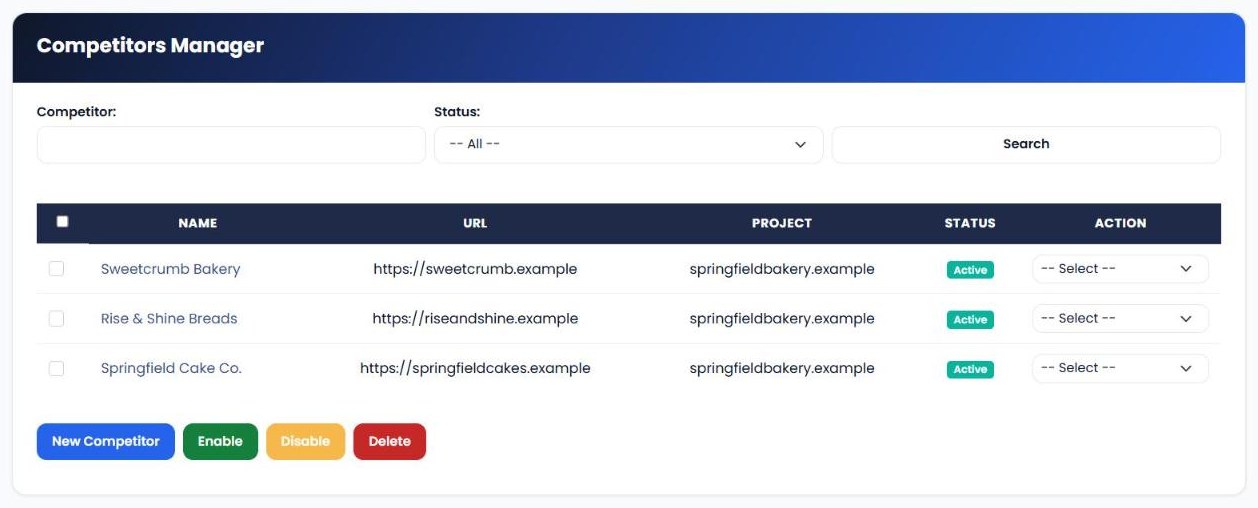
Open Competitor Manager and click New Competitor. Choose the project (your website), then enter the competitor's name and URL. Add as many competitors as you want to watch. You can enable, disable them at any time.
2. Make sure your keywords are tracked
Competitors Tracker compares positions for the keywords you track in Keyword Position Checker. Once your keywords and competitors are set up, their positions are recorded automatically alongside yours.
3. Compare performance side by side
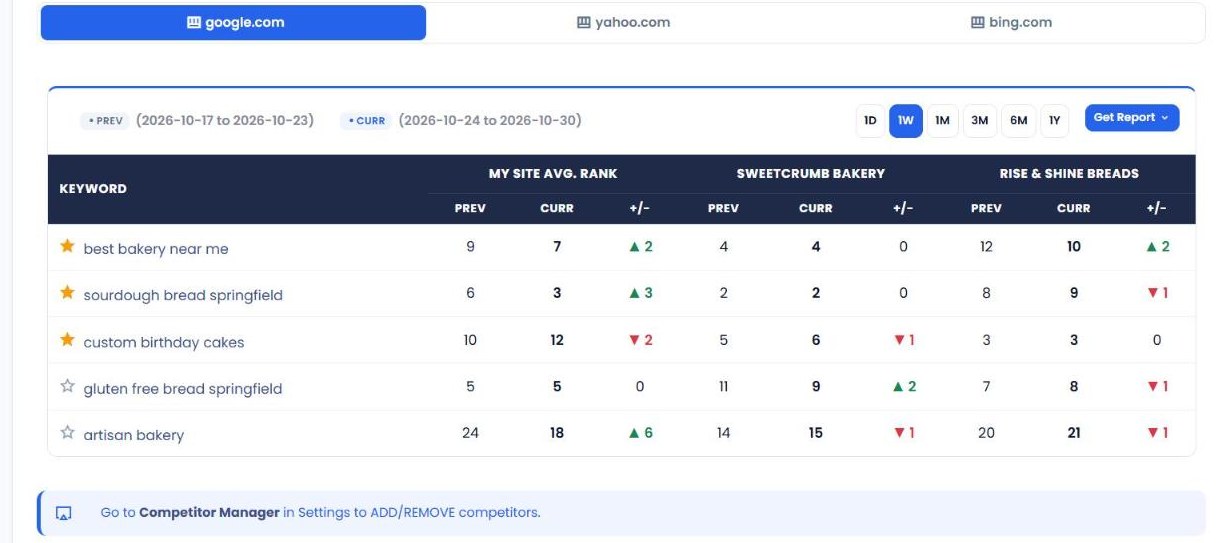
Open Competitor Performance to see each tracked keyword with your average rank and each competitor's, for the previous and current period, plus the change. Choose the search engine (google.com, yahoo.com or bing.com) and the comparison period (1D, 1W, 1M, 3M, 6M or 1Y). Click a result to see a chart of daily position changes for that keyword.
4. Star the keywords that matter most
Click the star next to any keyword to add it to your Favourite Summary. This builds a focused report around the handful of keywords that matter most to your business, without the noise of everything else you track.
5. Share or download the Favourite Summary
The Favourite Summary can be downloaded as a PDF or shared with a link, ready to send to a client, manager or business partner. These options depend on your plan.
| Feature | What it does |
|---|---|
| Competitor Manager | Add, enable, disable competitors for each project. |
| Competitor Performance | Your average rank vs. each competitor's for every tracked keyword, with the change. |
| Search engine tabs | Switch the comparison between Google, Yahoo and Bing. |
| Period comparison | Compare with 1 day, 1 week, 1 month, 3 months, 6 months or 1 year earlier. |
| Daily position chart | See day-by-day position changes for a keyword. |
| Favourite Summary | A focused report of your starred keywords, with PDF download and sharing. |
What to check first
- Keywords where a competitor is just above you. If they're 4th and you're 6th, a small improvement could move you past them.
- Keywords where you're dropping and a competitor is rising. This often means they've improved their page. Look at what changed and respond.
- Keywords where every competitor beats you. You may need a dedicated, more complete page for that topic.
- Your strongest keywords. Protect the positions where you lead by keeping those pages up to date.
- The right competitors. Track the sites that actually appear for your keywords, not just the businesses you think of as rivals.
Competitors Tracker vs. other My PR Manager tools
| Tool | Main job | Use it when |
|---|---|---|
| Competitors Tracker | Compare your keyword rankings with competitors over time. | You want to know who's winning the searches that matter. |
| Keyword Position Checker | Track your own daily ranking positions. | You want detailed history for your own keywords. |
| Page Rank Auditor | Compare authority and SEO metrics with competitors. | You want to know why competitors outrank you. |
| Links Inspector | Analyse backlinks, including competitors'. | You want to find the links helping competitors rank. |
Who Competitors Tracker is for
- Local businesses competing with a few nearby rivals for the same searches.
- SEO consultants and agencies who need to show clients how they compare with the competition.
- E-commerce and service businesses in crowded markets where every position counts.
- Marketing managers who want a simple, shareable summary of the keywords that matter most.
Frequently asked questions
How many competitors can I track?
You can add several competitors for each project in Competitor Manager. Your plan may set limits on keywords and features.
Which keywords are compared?
The keywords you track in Keyword Position Checker. Add a keyword there, and competitor positions for it will appear in Competitor Performance.
Which search engines are supported?
Competitor Performance has tabs for google.com, yahoo.com and bing.com, so you can compare positions on each.
What is the Favourite Summary?
It's a report of the keywords you've starred in Competitor Performance. Use it to focus on your most important keywords and share the results.
Can I share reports with clients?
Yes, depending on your plan. The Favourite Summary can be downloaded as a PDF or shared directly.
Start tracking your competitors
Knowing where you rank is useful. Knowing where you rank compared with the businesses you're competing against is what helps you win. Sign in to My PR Manager, add your competitors in Competitors Tracker, and see where you stand today.
Related guides: Keyword Position Checker · Page Rank Auditor · Links Inspector · Page Rank Tracker


