
PageSpeed Insights: Know Your Site Speed Score, Desktop and Mobile

Table of Contents
- Key takeaways
- What is a PageSpeed score?
- How PageSpeed Insights works
- 1. Choose your website
- 2. Let it check automatically
- 3. Compare periods in Historical Analysis
- 4. Review daily PageSpeed Reports
- 5. Test pages instantly
- What to fix first
- PageSpeed Insights vs. other My PR Manager tools
- Who PageSpeed Insights is for
- Frequently asked questions
- Where do the scores come from?
- Why is my mobile score lower than my desktop score?
- Why does my score change from one check to the next?
- How many pages can I check at once?
- Does page speed affect Google rankings?
- Start tracking your page speed
A slow website costs you twice. Visitors leave before the page finishes loading, and Google takes page experience into account when ranking results. Speed problems also tend to creep in quietly: a new plugin, a large image or an extra tracking script can slow every page without anyone noticing. PageSpeed Insights in My PR Manager uses Google's PageSpeed data to track your desktop and mobile speed scores automatically, shows how they change over time, and lets you test any page in seconds, so you can catch slowdowns before they cost you visitors.
Key takeaways
- Track your website's desktop speed, mobile speed and mobile usability scores from Google PageSpeed Insights.
- See the change since the previous check in daily reports, and compare periods from 1 week to 1 year.
- Open the details of any check to see Google's suggestions for making the page faster.
- Test up to five URLs at once with Quick PageSpeed Checker, including competitors' pages.
- Checks run automatically, so you don't need to remember to test your site.
What is a PageSpeed score?
Google PageSpeed Insights tests how quickly a page loads and becomes usable, and gives it a performance score from 0 to 100, separately for desktop and mobile. Scores of 90 and above are considered good, 50 to 89 need improvement, and below 50 is poor. The score is based on lab measurements such as how quickly the main content appears and how much the layout shifts while loading, which are closely related to Google's Core Web Vitals.
Mobile scores are usually lower than desktop scores, because tests simulate a slower phone and connection. Since Google mainly uses the mobile version of your site for ranking, the mobile score deserves the most attention.
How PageSpeed Insights works
1. Choose your website
PageSpeed Insights works with the websites in your My PR Manager account. Select a website in any of the reports to see its scores.
2. Let it check automatically
Desktop speed, mobile speed and mobile usability scores are checked automatically on a schedule using Google's PageSpeed data, so a history builds up without any manual testing.
3. Compare periods in Historical Analysis
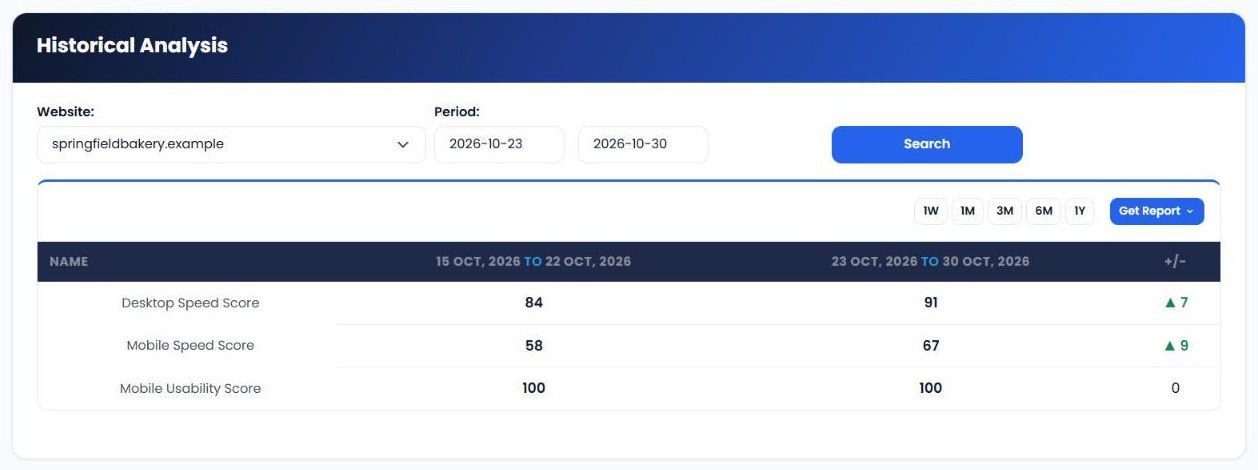
Historical Analysis compares your scores between two periods. Choose 1W, 1M, 3M, 6M or 1Y, or set your own dates, and the change column shows whether each score has improved or declined.
4. Review daily PageSpeed Reports
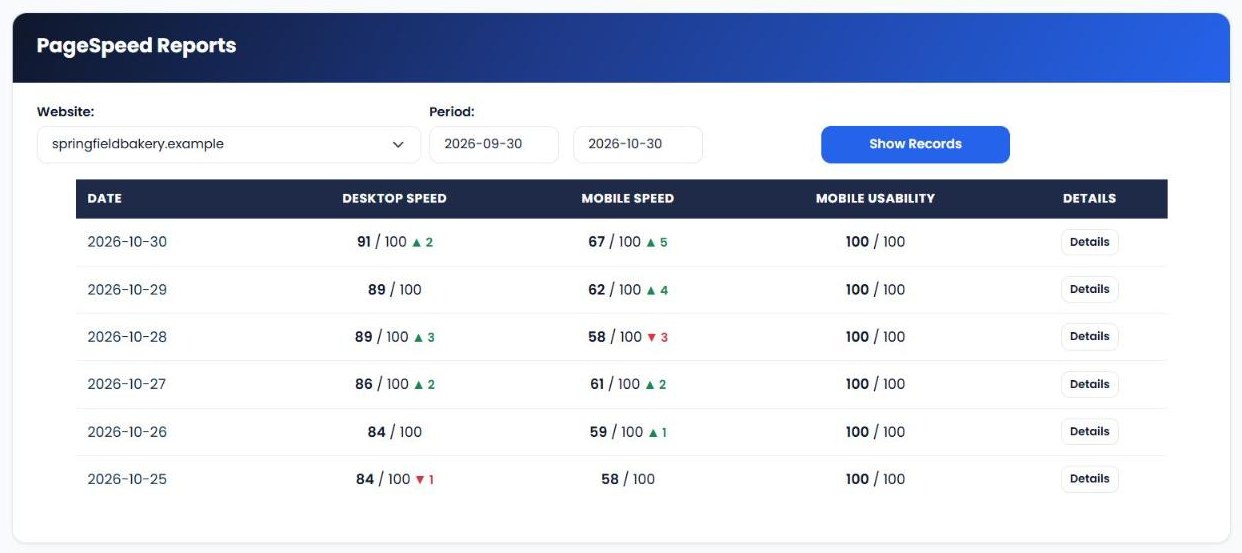
PageSpeed Reports list each check by date with desktop speed, mobile speed and mobile usability, each out of 100, plus the change since the previous check. Click Details to see Google's recommendations for that check, grouped by impact, such as compressing images or removing unused code. Graphical Reports chart the same scores over time.
5. Test pages instantly
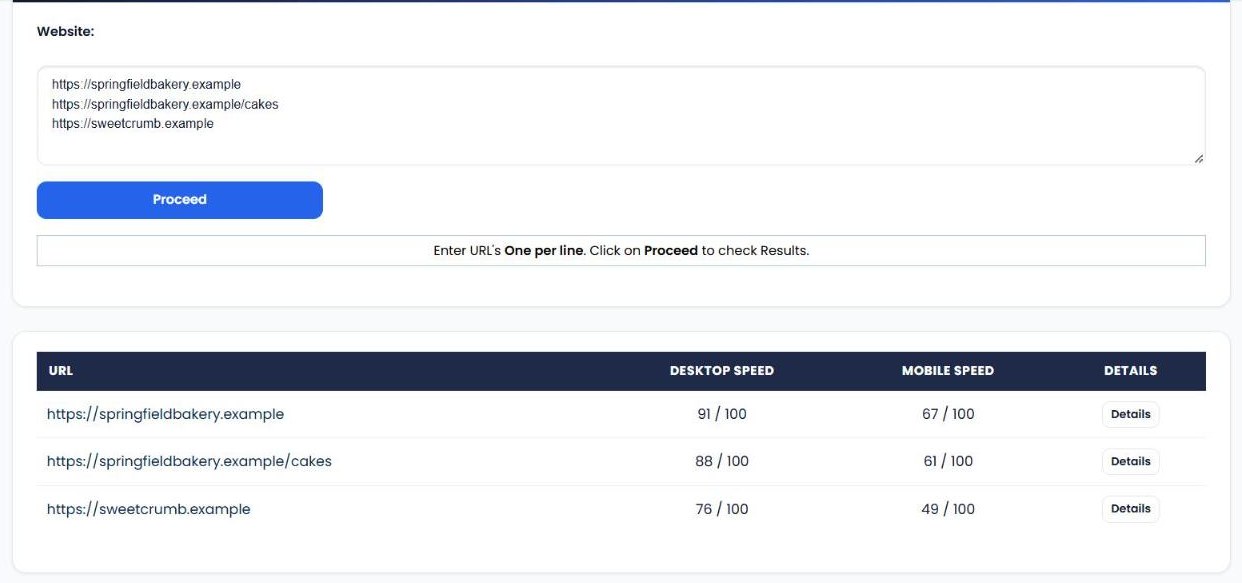
Quick PageSpeed Checker lets you enter up to five URLs, one per line, and get desktop and mobile scores for each. Use it to test a new page before promoting it, check a page after making changes, or compare your speed with a competitor's. The number of quick checks per day depends on your plan.
| Score | What it tells you |
|---|---|
| Desktop speed | How quickly the page loads and becomes usable on a desktop computer (0 to 100). |
| Mobile speed | The same test on a simulated mobile phone and connection (0 to 100). |
| Mobile usability | How well the page works on mobile devices (0 to 100). |
| 90 to 100 | Good. |
| 50 to 89 | Needs improvement. |
| 0 to 49 | Poor. |
What to fix first
- Large images. Oversized images are the most common cause of slow pages. Resize them and use modern formats like WebP.
- Unused scripts and plugins. Every plugin, chat widget and tracking script adds weight. Remove anything you don't need.
- Render-blocking resources. CSS and JavaScript that load before the content can delay the page. Defer what isn't needed straight away.
- Server response time. Slow hosting holds everything back. Caching and a content delivery network (CDN) can help a lot.
- Sudden score drops. If a score falls overnight, check what changed on the site that day, such as a new plugin, theme update or large image.
PageSpeed Insights vs. other My PR Manager tools
| Tool | Main job | Use it when |
|---|---|---|
| PageSpeed Insights | Track desktop and mobile speed scores over time. | You want to keep your site fast and catch slowdowns. |
| Search Engine Saturation | Track how many pages are indexed on Google and Bing. | You want to spot indexing problems early. |
| Webmaster Tools | Show Search Console clicks, impressions and position. | You want to see whether speed improvements bring more traffic. |
| Keyword Position Checker | Track daily keyword rankings. | You want to see the ranking impact of your technical work. |
Who PageSpeed Insights is for
- Small business owners who want to make sure their website isn't losing customers to slow loading.
- Web developers who need to confirm that changes and updates haven't slowed the site down.
- SEO consultants and agencies who monitor technical health for clients.
- E-commerce stores, where every second of loading time can affect sales.
Frequently asked questions
Where do the scores come from?
They come from Google PageSpeed Insights, the same service you can use on Google's website. My PR Manager runs the checks automatically and keeps the history for you.
Why is my mobile score lower than my desktop score?
Mobile tests simulate a slower phone and network connection, so the same page usually scores lower on mobile. That's normal, but it's also why mobile speed deserves the most attention.
Why does my score change from one check to the next?
Scores can vary slightly between tests because of network and server conditions. Look at the trend over a week or a month rather than a single result.
How many pages can I check at once?
Quick PageSpeed Checker accepts up to five URLs per check. The number of quick checks per day depends on your plan.
Does page speed affect Google rankings?
Page experience, including loading speed, is one of many factors Google considers. Speed matters most when competing pages are similar in relevance, and it always matters for keeping visitors on your site.
Start tracking your page speed
A fast website keeps visitors happy and gives you an edge in search. Sign in to My PR Manager, open PageSpeed Insights, and see your desktop and mobile scores today.
Related guides: Search Engine Saturation · Webmaster Tools · Keyword Position Checker · SEO Dashboard


