
Google Local 3-Pack Tracking: How to Know When You Show Up in Local Search

Table of Contents
- Key takeaways
- What is the Google Local 3-Pack?
- Why organic rankings don't tell you about the local pack
- How to track your Local 3-Pack rankings
- 1. Add your business
- 2. Add the keywords your customers search for
- 3. Let the daily checks run
- 4. Read the Summary dashboard
- 5. Review the Local Performance Report
- Find out why competitors outrank you with the AI Audit
- How to improve your Local 3-Pack ranking
- Who GMB Local 3-Pack is for
- Frequently asked questions
- What is the Google Local 3-Pack?
- How is the local pack different from organic rankings?
- How often are Local 3-Pack positions checked?
- Why should I include the city in my keywords?
- What is a Google Place ID and why does it matter?
- Can I share Local 3-Pack results with clients?
- How long does it take to get into the Local 3-Pack?
- Start tracking your local visibility
When someone searches for a local service, such as "dentist near me" or "plumber in Austin", Google usually shows a map with three businesses at the top of the results. This is the Google Local 3-Pack, and for local businesses it is often the most valuable spot on the page: it appears above the regular results and gives searchers your phone number, directions and reviews in one glance. Ranking well in the organic results does not guarantee a place in it. GMB Local 3-Pack in My PR Manager tracks whether your business is actually showing up there, keyword by keyword, and helps you work out what to fix when it isn't.
Key takeaways
- The Local 3-Pack is the map and three business listings Google shows for local searches, and it is ranked separately from the organic results.
- GMB Local 3-Pack checks every tracked keyword daily and records whether you appear, your position, your rating and your review count.
- A trend arrow and the Local Performance Report show how your local visibility changes over time.
- The AI Audit compares your listing with the businesses ranking above you and gives you a prioritised list of improvements.
- Audits can be downloaded as a PDF or shared with a link, which makes client reporting easy.
What is the Google Local 3-Pack?
The Local 3-Pack (also called the local pack or map pack) is the block of three Google Business Profile listings shown with a map for searches that have local intent. Each listing shows the business name, star rating, review count, category, opening hours and quick buttons for calling, directions and the website.
Google ranks these listings using three main factors:
- Relevance: how well your Google Business Profile matches what the searcher is looking for, based on your categories, services, description and website.
- Distance: how close your business is to the searcher or to the location in the search.
- Prominence: how well known your business is, based on reviews, ratings, links, citations and mentions across the web.
Because these signals change all the time, your position can move without any change on your side: a competitor collects new reviews, someone opens nearby, or Google updates its local algorithm. That is why tracking it directly is the only reliable way to know where you stand.
Why organic rankings don't tell you about the local pack
A regular rank tracker reports where your website appears in the blue-link results. The local pack is a separate system built on Google Business Profile data, so a page that ranks third organically can be missing from the map entirely, and a business with a modest website can hold the top spot in the pack. If local customers matter to you, you need to measure both. GMB Local 3-Pack covers the map; the Keyword Position Checker covers the organic results.
How to track your Local 3-Pack rankings
1. Add your business
Open GMB Business Manager and add your business with its name, its Google Place ID and the country it operates in. The Place ID is the most reliable way to identify your listing, because it stays the same even if your business name appears slightly differently in search results. If you don't know it, use Find My Business to search for your listing and fill in both fields automatically.
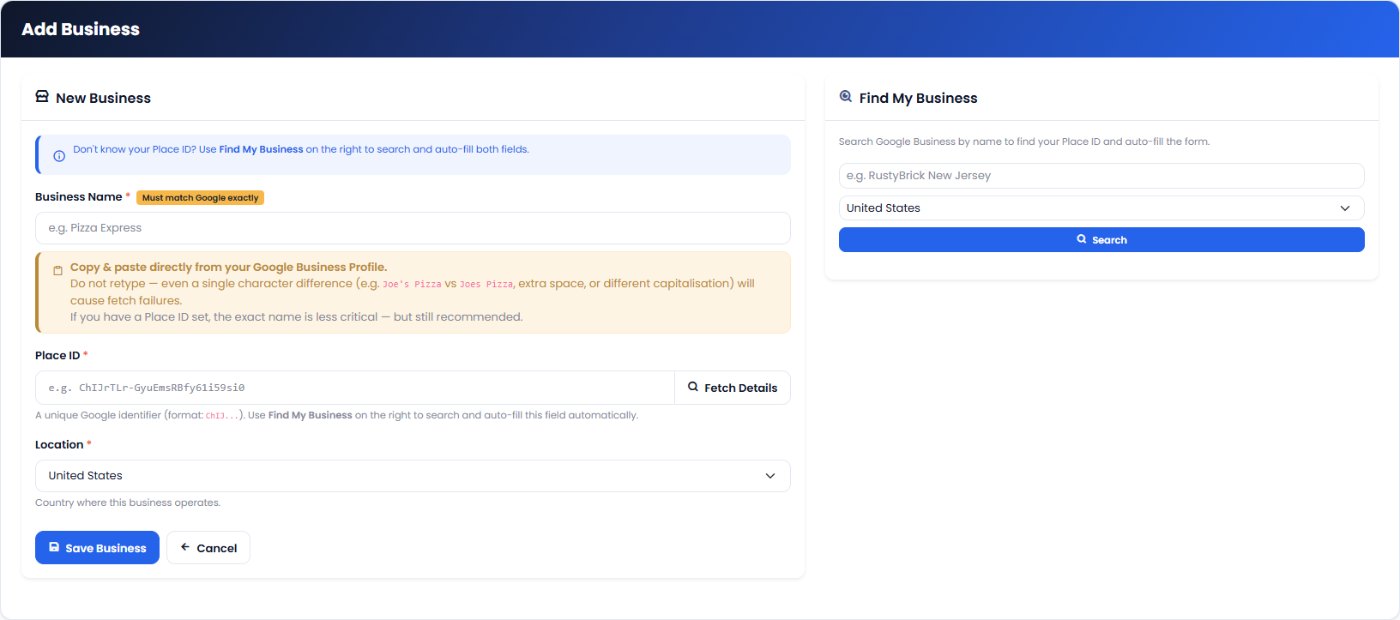
2. Add the keywords your customers search for
In GMB Keywords Manager, add the searches you want to appear for, one at a time or in bulk. Include the city or area in the keyword, for example emergency plumber austin or dentist downtown denver. That matches how people search and tells Google which local results to show.
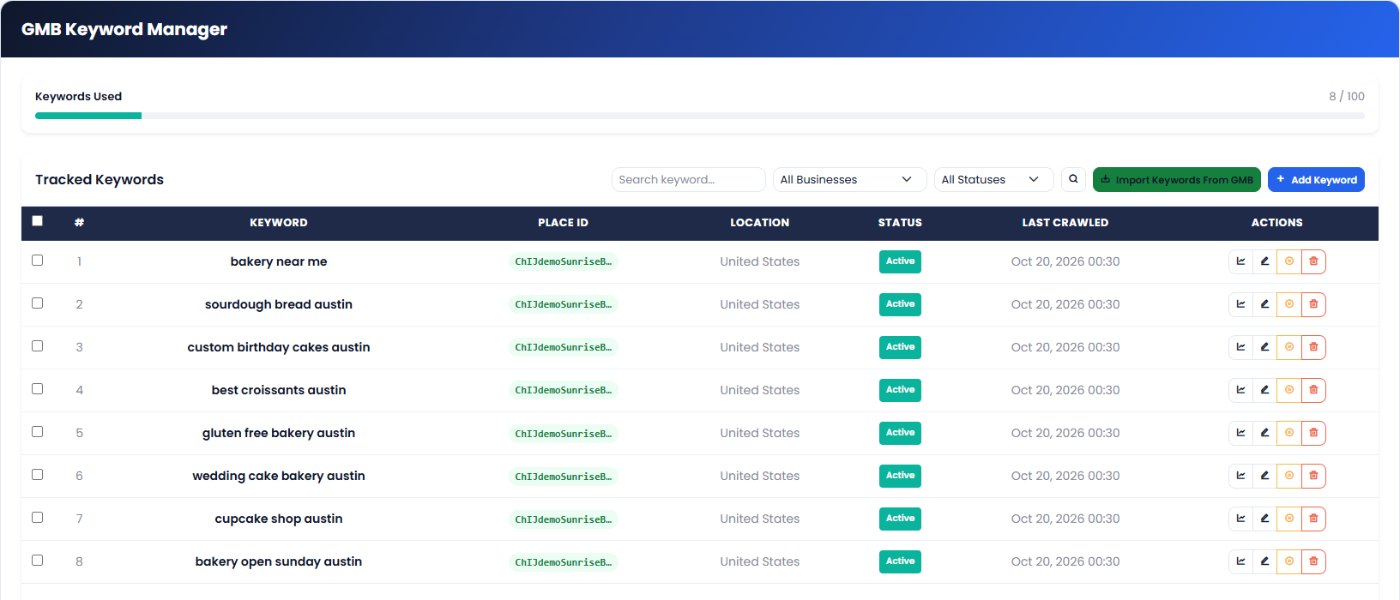
3. Let the daily checks run
Every tracked keyword is checked automatically each day. Each check records whether your business was found in the local pack, your position, your average rating, your review count and the other businesses that appeared. Use Refresh Ranking on any keyword when you want a fresh result straight away, for example after updating your profile.
4. Read the Summary dashboard
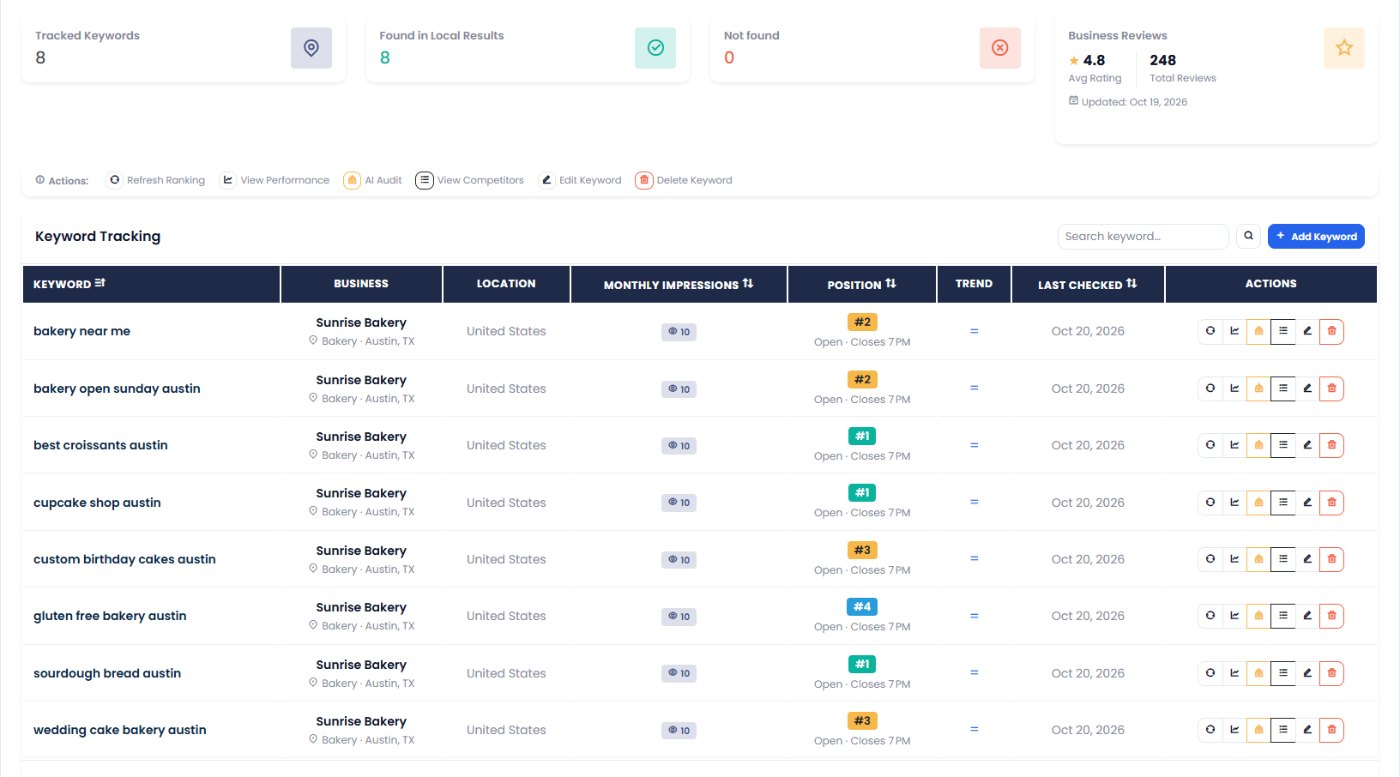
The Summary shows every tracked keyword in one table:
| Column | What it tells you |
|---|---|
| Found in Local Results | Whether your business appeared in the local pack for that search. |
| Position | Where you appeared. Position 1 is the top of the pack. |
| Trend | Whether you moved up, moved down, started ranking or dropped out since the earlier check. |
| Avg Rating and Total Reviews | Your average star rating and number of reviews as Google shows them. |
Click View Competitors on any keyword to see every business in that local pack, with their ratings and review counts, so you know exactly who you are competing with.
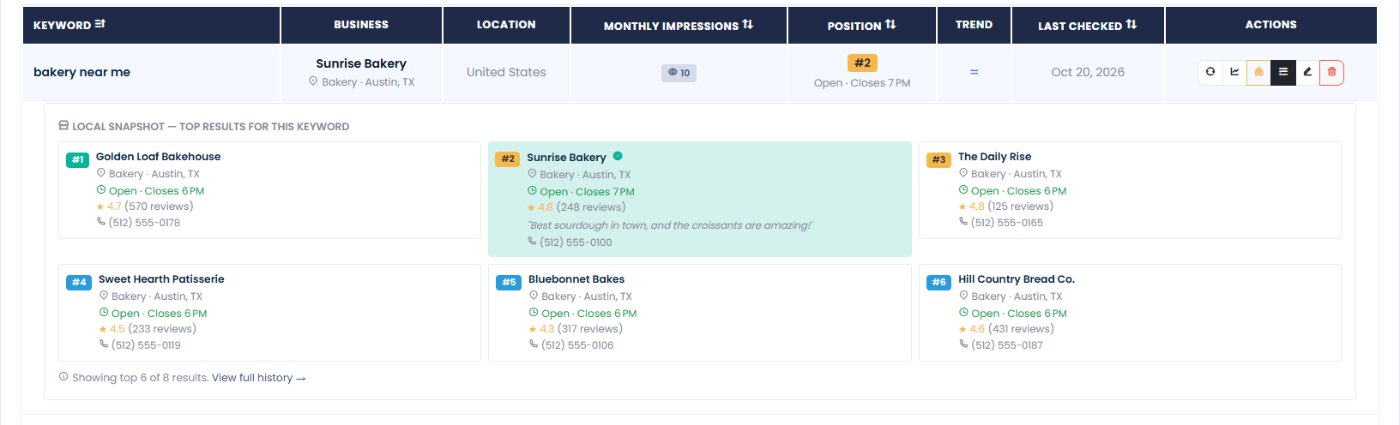
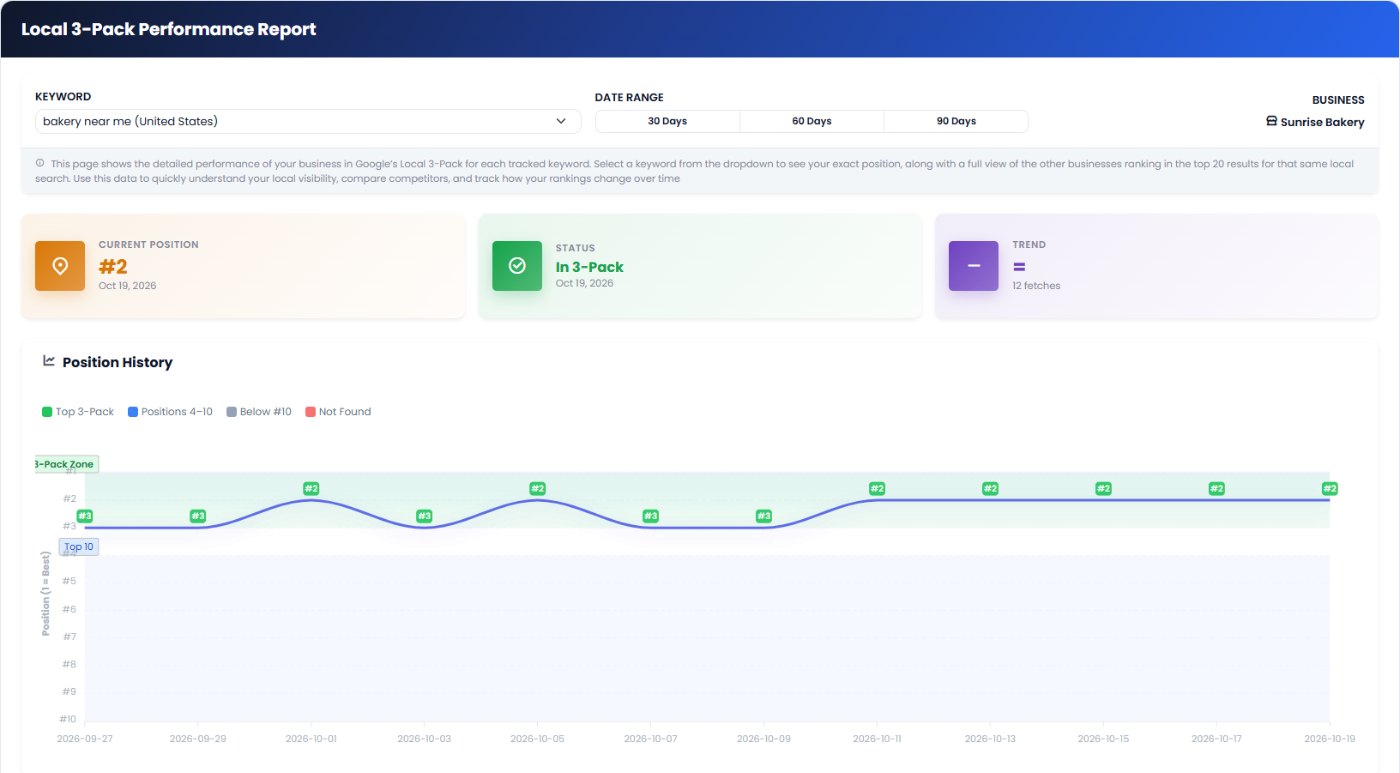
5. Review the Local Performance Report
The Local Performance Report rolls your results up over a period, so you can see how many keywords you appear for, how your positions have moved and whether your local visibility is growing or shrinking. It is the view to use for monthly reviews and client updates.
Find out why competitors outrank you with the AI Audit
Knowing your position is only half the job; you also need to know what to change. The AI Audit takes one tracked keyword and analyses:
- Your current position, rating, review count and recent trend.
- The businesses ranking above and around you, with their ratings, review counts and descriptions.
- Your position history from the most recent checks.
It then gives you a clear, prioritised list of improvements, such as closing a review gap, adding missing categories or services, or strengthening your profile description, instead of generic local SEO advice. Every audit is saved in AI Audit History, and depending on your plan you can download it as a PDF or send a share link to a client or colleague.
How to improve your Local 3-Pack ranking
- Complete your Google Business Profile. Choose an accurate primary category, add secondary categories, list your services and products, and write a clear description.
- Keep your NAP consistent. Your business name, address and phone number should match exactly on your website and every directory. The Business Listing Manager checks this for you.
- Earn reviews steadily. Ask happy customers for reviews and reply to every review with a personal response, not a copy-paste template. Track your progress with Business Review Stats.
- Post regularly on your profile. Offers, updates and events show Google the listing is active. See how in our Business Post Manager guide.
- Support your profile with your website. Add a location page with your NAP, an embedded Google Map, local content and an FAQ section, so Google can confirm your relevance.
- Build local prominence. Accurate citations, local links and mentions in local media all strengthen your listing.
Who GMB Local 3-Pack is for
- Local businesses such as clinics, trades, restaurants, salons and law firms that depend on nearby customers.
- Multi-location brands that need to see which locations are visible for which searches.
- SEO agencies that report local visibility to clients and need evidence that their work is moving positions.
Frequently asked questions
What is the Google Local 3-Pack?
It is the block of three Google Business Profile listings, shown with a map, that Google displays at the top of results for searches with local intent, such as "plumber near me" or "coffee shop in Leeds".
How is the local pack different from organic rankings?
The local pack is ranked from Google Business Profile data using relevance, distance and prominence, while organic results rank web pages. Your business can rank well in one and be missing from the other, so it is worth tracking both.
How often are Local 3-Pack positions checked?
Every tracked keyword is checked automatically once a day. You can also run an immediate check on any keyword with Refresh Ranking.
Why should I include the city in my keywords?
Local results depend on location. Adding the city or area to the keyword, for example "plumber austin", matches how customers search and gives you results for the place you actually serve.
What is a Google Place ID and why does it matter?
A Place ID is Google's unique identifier for your business listing. Using it means GMB Local 3-Pack recognises your listing even if the name in the results is written slightly differently. Use Find My Business to look it up automatically.
Can I share Local 3-Pack results with clients?
Yes. AI Audits can be downloaded as a PDF or shared through a link, depending on your plan, and the Local Performance Report gives you a period summary for regular updates.
How long does it take to get into the Local 3-Pack?
There is no fixed timeline. Profile fixes such as categories and services can show results within weeks, while prominence signals like reviews and citations build over months. Daily tracking shows you exactly when your changes start to work.
Start tracking your local visibility
Open GMB Local 3-Pack from the left menu in My PR Manager, add your business with its Place ID, and track the five searches your customers use most. Within a day you will know where you appear, and the AI Audit will show you what to fix first. New to My PR Manager? Start your free trial.
Related guides: Business Review Stats · Business Listing Manager · Business Post Manager · Competitors Tracker


