
Keyword Research Tool: From One Keyword to a Full Content Brief

Table of Contents
- Key takeaways
- What is keyword research?
- How Keyword Research Tool works
- 1. Enter your keyword and settings
- 2. Review the overview
- 3. Explore volume and related keywords
- 4. Use the AI content assets
- 5. Come back to previous scans
- What to check first
- Keyword Research Tool vs. other My PR Manager tools
- Who Keyword Research Tool is for
- Frequently asked questions
- Which search engines and countries can I research?
- Why are some numbers empty?
- Which AI is used for the content assets?
- Can I go back to an old report?
- Should I use the AI content brief as-is?
- Start your keyword research
Good content starts with the right keyword. But proper keyword research usually means jumping between several tools: one for search volume, another for difficulty, a search engine to see who's ranking, something else for related terms, and then a blank page when it's time to plan the article. Keyword Research Tool in My PR Manager brings all of that together. Enter one keyword, choose your search engine, country and language, and get the numbers you need to decide whether it's worth targeting, plus AI-generated content assets, from a definition and FAQs to a full content brief and ready-to-use meta tags.
Key takeaways
- Research any keyword for Google or Bing, in a specific country and language.
- See keyword difficulty, monthly search volume, competition and cost per click (CPC).
- Review the current top search results, plus related and supporting keywords worth targeting.
- Get AI-generated content assets: a definition, trending topic ideas, outbound link suggestions, FAQs, a content brief and meta tags.
- Every scan is saved in Previous Scans, where you can view, re-run, save or download it as a PDF.
What is keyword research?
Keyword research is the process of finding the words and phrases people type into search engines, and deciding which ones your content should target. A good target keyword has enough search volume to be worth the effort, a difficulty level you can realistically compete at, and clear search intent that matches what your page offers.
Keyword research doesn't stop at the numbers. To rank, you also need to understand what's already ranking, which related questions people ask, and how to structure content that answers them better. That's where most research stalls, and where this tool keeps going.
How Keyword Research Tool works
1. Enter your keyword and settings
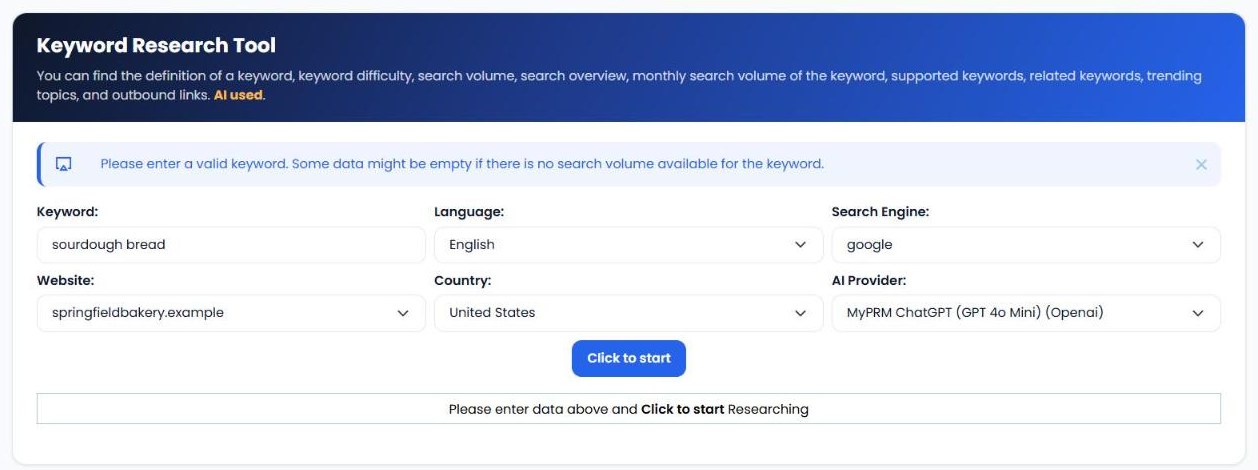
Open Research Keyword, enter the keyword or phrase, and choose the language, search engine (Google or Bing), website, country and AI provider, from ChatGPT, DeepSeek or Gemini models. Click Click to start.
2. Review the overview
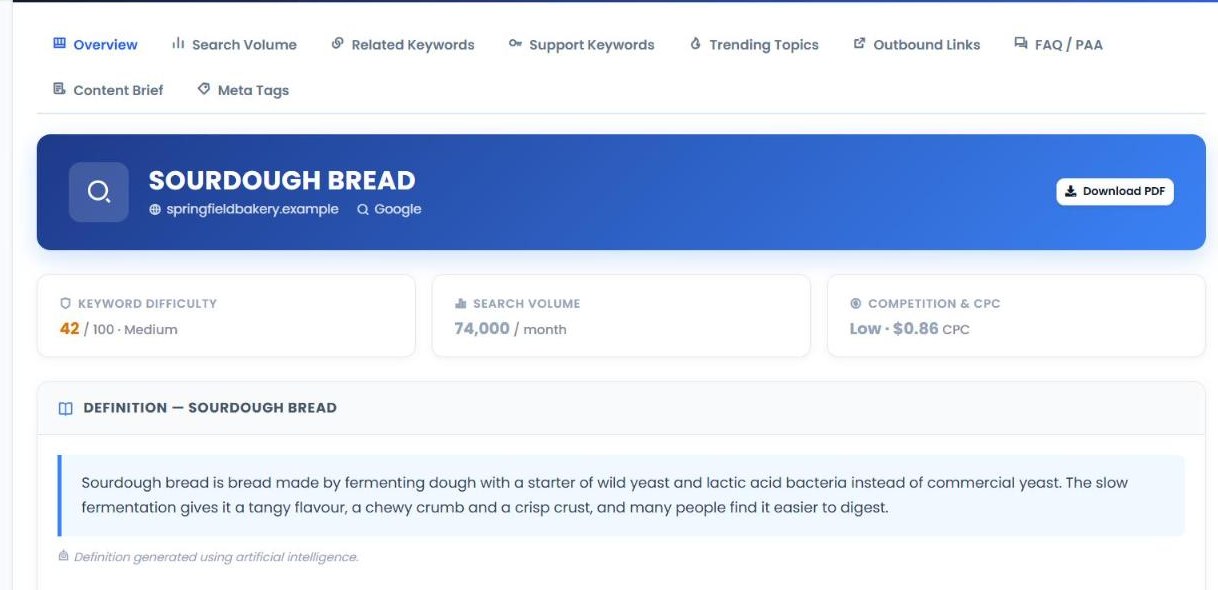
The Overview shows the essentials at a glance: keyword difficulty, search volume and competition & CPC, an AI-written definition of the term and a search overview of the current top results, including their backlinks, so you can see who you're competing with.
3. Explore volume and related keywords
The Search Volume tab shows monthly search volume over time, so you can spot seasonal trends. Related Keywords and Support Keywords suggest other terms to target in the same article or in supporting content.
4. Use the AI content assets
The remaining tabs turn research into content you can use:
- Trending Topics: title and description ideas based on what's currently trending for the keyword.
- Outbound Links: suggested authoritative sources to link to.
- FAQ / PAA: frequently asked questions with answers, ideal for FAQ sections and schema markup.
- Content Brief: target audience, search intent, H1, meta description, content angle and a full outline.
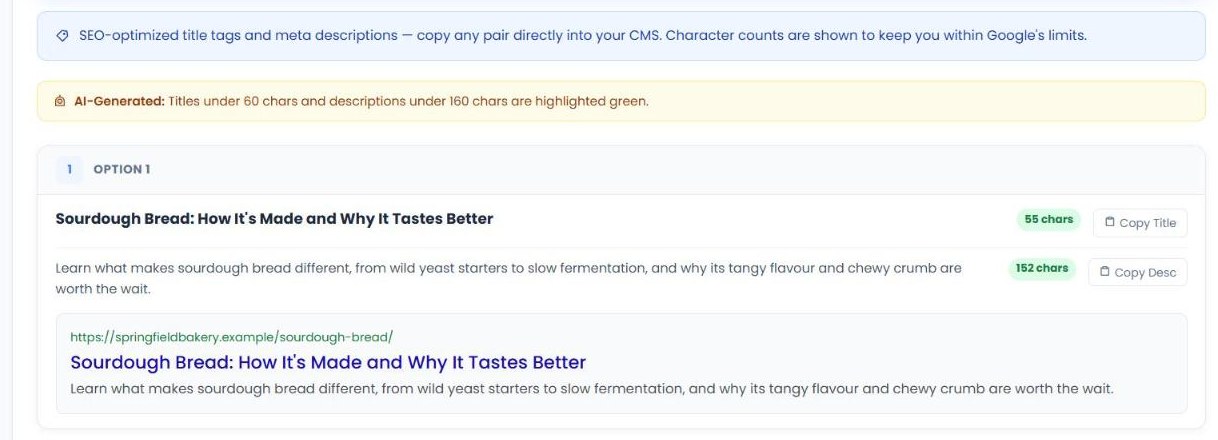
- Meta Tags: several title and meta description options with character counts and a search result preview, ready to copy.
5. Come back to previous scans
Every research run is saved in Previous Scans, with the keyword, website, search engine, country, language and date. From there you can View the report, Re-Run it for fresh data, Save Keyword or Delete it. Each report can also be downloaded as a PDF.
| Tab | What you get |
|---|---|
| Overview | Difficulty, volume, competition and CPC, a definition and the current top results. |
| Search Volume | Monthly search volume over time. |
| Related Keywords | Related terms to target. |
| Support Keywords | Supporting terms for the same topic. |
| Trending Topics | Title and description ideas based on current trends. |
| Outbound Links | Suggested sources to link to. |
| FAQ / PAA | Common questions and answers. |
| Content Brief | Audience, intent, H1, meta description, angle and outline. |
| Meta Tags | Title and description options with character counts. |
What to check first
- Difficulty vs. your authority. Newer or smaller sites should start with lower-difficulty keywords and work up.
- Search intent. Look at the top results. If they're all shops and you're writing a guide (or vice versa), the keyword may not fit your page.
- Seasonality. Check monthly volume. Publish seasonal content a few weeks before demand peaks.
- Long-tail opportunities. Related and support keywords often have less competition and clearer intent.
- Questions to answer. Use the FAQ / PAA tab to make sure your content answers what people actually ask.
Keyword Research Tool vs. other My PR Manager tools
| Tool | Main job | Use it when |
|---|---|---|
| Keyword Research Tool | Research a keyword and generate content assets. | You're planning new content. |
| Keyword Position Checker | Track daily rankings for chosen keywords. | Your content is published and you want to watch it rank. |
| AEO Page Auditor | Check content for AI answer engine readiness. | Your draft is written and you want it cited by AI. |
| Article Publisher | Create and publish articles. | You're ready to turn the brief into a published post. |
Who Keyword Research Tool is for
- Bloggers and content writers who want a ready-made brief instead of a blank page.
- Small business owners deciding which services and topics to write about.
- SEO consultants and agencies producing keyword research and content plans for clients.
- E-commerce stores researching product and category keywords.
Frequently asked questions
Which search engines and countries can I research?
You can choose Google or Bing, plus the country and language you want results for.
Why are some numbers empty?
If a keyword has very little search volume, some data may not be available. Try a broader or more common variation.
Which AI is used for the content assets?
You choose the AI provider when you start, from the ChatGPT, DeepSeek and Gemini options available on your account.
Can I go back to an old report?
Yes. Every scan is saved in Previous Scans, where you can view it, re-run it for fresh data or download it as a PDF.
Should I use the AI content brief as-is?
Use it as a starting point. Adapt the outline and tone to your brand, and add your own experience and examples.
Start your keyword research
The right keyword and a clear brief make every piece of content easier to write and more likely to rank. Sign in to My PR Manager, open Keyword Research Tool, and turn your next keyword into a ready-to-write plan.
Related guides: Keyword Position Checker · AEO Page Auditor · Article Publisher · Article Rewrite Manager


